Affiliate links on Android Authority may earn us a commission. Learn more.
One UI 8: What we know so far and what we want to see from Samsung's next update

Samsung’s One UI 7 software release, based on Android 15 recently rolled out globally, but the company is wasting little time with the next platform update. The company is going straight to One UI 8 with the launch of its upcoming foldables, the Galaxy Z Fold 7 and Galaxy Z Flip 7. These foldables and the new platform update are still some time away, but here’s what to expect from the Android 16-based One UI 8, what we already know, and what we want to see!
One UI 8 expected release date, name, and Android version
- One UI 5.0: October 2022
- One UI 5.1: February 2023
- One UI 5.1.1: August 2023
- One UI 6.0: October 2024
- One UI 6.1: January 2024
- One UI 6.1.1: July 2024
- One UI 7.0: January 2024
Samsung usually reserves a full version increase for One UI for its Android platform update. For example, One UI 5 was released in October 2022 with the Android 13 platform update, and One UI 6 was released in October 2023 with Android 14 in tow.
When the Galaxy S-series flagships were eventually launched, One UI received a x.1 version bump. One UI 5.1 was released in February 2023 with the Galaxy S23 series, and One UI 6.1 was released in January 2024 with the Galaxy S24 series. Similarly, the launch of Samsung’s foldables in the middle of the year brings an x.x.1 version bump. One UI 5.1.1 arrived in August 2023 with the Galaxy Z Fold 5 and Flip 5, and One UI 6.1.1 arrived in July 2024 with the Galaxy Z Fold 6 and Flip 6.

With One UI 7, all of this history goes for a toss. Even though Google released Android 15 in October 2024, Samsung chose to delay the stable rollout for its older flagships until its newest Galaxy S25 series phone launched in January 2025. The update continued to be further delayed for older flagships, and global stable rollout began only in late April 2025. That’s half a year of delay for the platform update to reach more Samsung phones.
Samsung has already broken its own tradition here when the company announced the One UI 8 beta program on May 28. That means there’s no One UI 7.1 release this time. This news comes a while after leaker Ice Universe claimed that One UI 8 will indeed replace One UI 7.1.

So, when will stable One UI 8 be coming? Well, Samsung confirmed in a blog post that One UI 8 will debut on its new foldables in the summer. A Korean outlet previously reported that these devices will “most likely” launch in the first week of July. Google has already launched stable Android 16 to Pixel devices, so Google isn’t standing in the way of the update rollout anymore.
Samsung debuted One UI 7 on the Galaxy S25 series, but the stable update took a while to reach older devices. So, we’re guessing this same scenario will play out with One UI 8.
Is there a One UI 8 beta? How to sign up for it?

Samsung runs beta programs for its updates, testing them out on older flagships before launching the stable release first on new flagships. The company ran a rather extensive beta program for One UI 7, and it’s on track for this release too. Samsung has already released One UI 8 Beta 1 and Beta 2 updates so far.
To enroll in the One UI 8 beta program on your eligible device, you will need to download the Samsung Members app, sign in with your Samsung Account. If you are in an eligible region, you will see a One UI 8 Beta Program banner on the home page, which you need to click on and complete your registration. Once done, you can check for an impending update at Settings > Software update > Download and Install. Download the update and let us know your thoughts about the changes coming with Samsung’s hottest new software release!
One UI 8 expected and rumored features

The One UI 8 beta is now available on some devices, giving us a good idea of what to expect from the stable software. However, it’s worth noting that this doesn’t seem to be a substantial update over One UI 7. By contrast, One UI 7 was a major update over One UI 6.
Between the newly available One UI 8 beta and previous leaks, here’s what we’re expecting from the stable software when it’s eventually released.
- 90:10 multitasking split
- More powerful Dex mode
- Filter downloaded files by app
- Now Bar on Flip cover display
- Now Bar expanded to support phone calls and DND
- Now Brief to expand to some more devices
- Listen Brief: An audio version of Now Brief
- Dynamic wallpapers
- 4×4 large home screen widgets
- Improved Reminders app
- Improved Modes and Routines
- Improved Samsung Notes app with Math Solver
- Small visual changes to some apps
- Log video recording support
- Improvements to Quick Share
- Revamped Samsung Weather app
- AI video summary through Samsung Internet
- 12GB RAM Plus limit
- New “Private” album option in Samsung Gallery
- An improved Secure Folder fixed with Private Space API
- Auracast redesign
- Improved alarm group functionality
- Predictive back gesture expands to more apps
- HDR screenshots
- Quick access to earbuds control on lock screen
- Deeper integration for Samsung’s older earbuds
90:10 multitasking split
Pixel devices will get the new upcoming 90:10 multitasking split with an upcoming Android 16 QPR update, and the rest of the Android ecosystem will get it with Android 17. Only OnePlus and OPPO devices have access to this before Pixels, and it seems even Samsung will join in.
The 90:10 multitasking split screen view has been available since the first One UI 8 beta, and is expected to graduate to the stable release too.
As shown in the demo above, the split-screen view starts in 50:50 mode, but you can easily resize any app to become the dominant one, occupying 90% of the screen. The dominant app becomes significantly easier to use thanks to the abundant screen real estate. If you want to switch to the secondary app, you can tap on it to quickly make it the dominant app. This way, you can easily use two apps side by side in a 90:10 swappable split, without compromising the user experience as much as you would with a 50:50 split.
More powerful Dex mode
Samsung’s One UI 8 Beta 1 changelog confirms a welcome upgrade to Dex. The desktop mode now supports WQHD resolutions (for widescreen displays) and the ability to rotate the display 90, 180, or 270 degrees. We’re glad to see the former, especially after using the S25 Ultra’s Dex mode for emulation.
Leaker Iposdev also posted screenshots showing Dex mode on an early One UI 8 build (seen above), and claimed that this was derived from Android 16’s desktop mode. For what it’s worth, Google noted last week that Android 16’s mode was built on Dex’s foundation.
Filter downloaded files by app
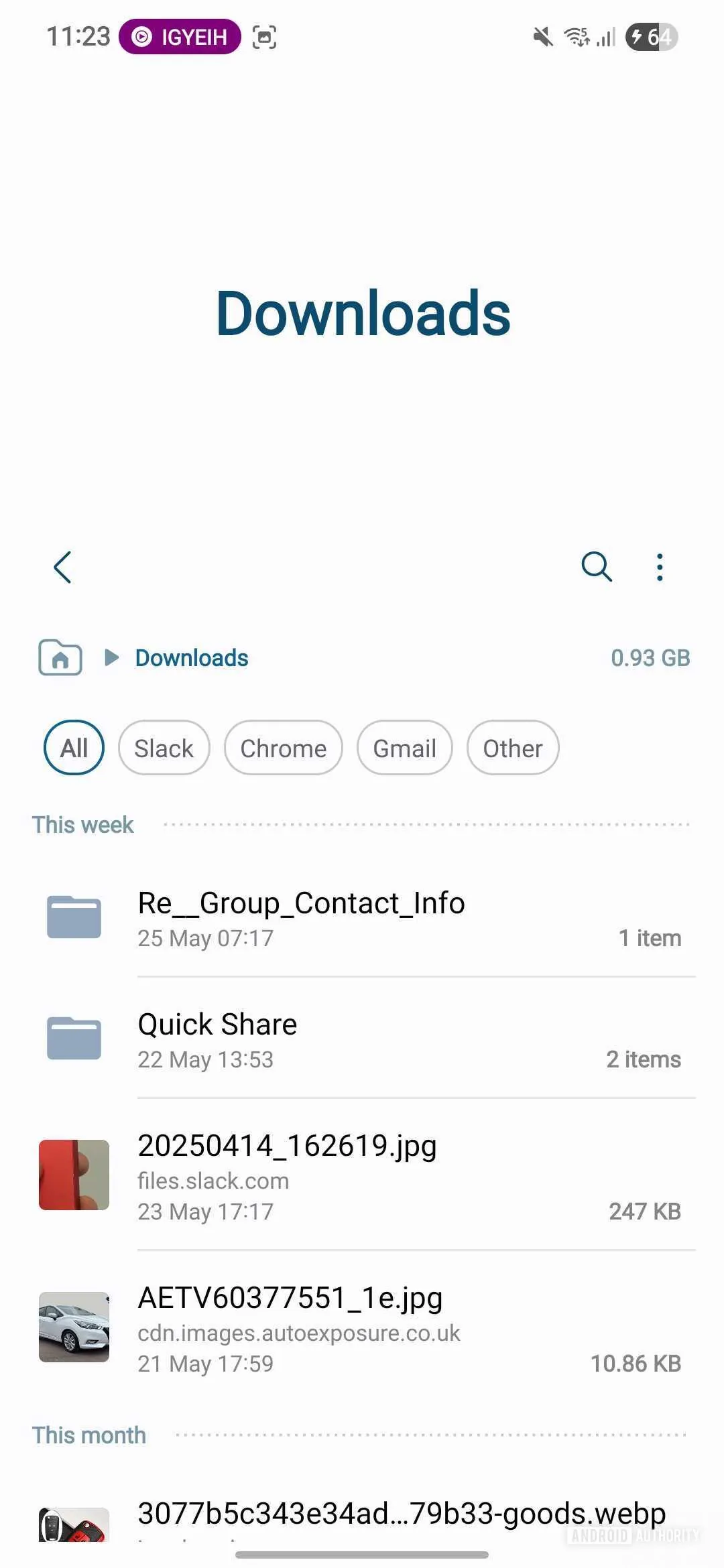
Another feature spotted in the One UI 8 Beta 1 is that you can now use the My Files app to filter downloaded files by the app that downloaded them. This is useful if you don’t know the file’s name, or if you’ve downloaded many files via several apps in quick succession.
Now Bar on Flip cover display
Currently, flip foldables like the Galaxy Z Flip 6 present the Now Bar only on the inner display. This partially defeats the purpose of a flip foldable, as users will have to open up the phone to access these controls quickly.
As shared by X user Gamer Omega, the Now Bar feature will make its way to the cover screen on flip foldables.
Samsung One UI 8 leak: Flip cover acreen now bar is FINALLY merged with the normal now bar pic.twitter.com/r9q6XUR12k— Gamer Omega (@Gamer0mega) May 1, 2025
Now Bar expanded to support phone calls and DND
Now Bar on the lock screen displays call and Do Not Disturb functionality with One UI 8 Beta 1.
Now Brief to expand to some more devices

A previous internal test build of One UI 8 suggests that the big feature addition here would be the rollout of Galaxy S25’s Now Brief feature from One UI 7 to more devices, including older flagships.
Listen Brief: An audio version of Now Brief
We dug into a leaked One UI 8 firmware and discovered that Samsung is working on a “Listen Brief” button. Check out our screenshots of the code snippets below.
Now Brief offers a summary of your morning, afternoon, or evening. This summary includes weather forecasts, upcoming calendar events, traffic updates, and news. However, the “Listen Brief” feature seems to be an audio version of Now Brief, allowing you to get all these details without reading.
One of the screenshots also hints that Listen Brief users can choose between Samsung and Google’s text-to-speech engines. Furthermore, another screenshot suggests that users can pause, play, or stop the audio briefing.
X user IposDev has shared a screen recording showcasing the upcoming Listen Brief feature. The feature may offer playback controls to pause, play, or stop the audio briefing and give users the option to select their preferred text-to-speech engine.
New “tts” brought to NowBrief (One Ui8, build ZYEF) pic.twitter.com/u9LaRkZtVu— IposDev (@DevOfIpos) May 13, 2025
Dynamic wallpapers
One UI 8 Beta 1 includes color-shifting dynamic wallpapers. These new wallpapers can be found by going to Settings > Wallpaper and style > Change wallpaper > Colors. There are four different time-based color variations, and these colors change as the day goes on.
You’ll see soft shades of blue in the morning, followed by bright greens and blues in the afternoon. When evening comes, the colors shift to warm reds and oranges. And the day finishes off with purples and dark blue hues at night.
While color shifting is a neat trick, it gets even better with gradient animations. When you power on or unlock your phone, a smooth gradient animation is said to be triggered, with the final gradient becoming your wallpaper. However, if you set the same dynamic wallpaper for the lock screen and home screen, the animation will continue until it reaches that color again.
4×4 large home screen widgets
With One UI 8 Beta 1, Samsung added the ability to expand widgets to a maximum of 4×4 size, up from the 4×3 size. The behavior was a bit wonky, though, which was ultimately fixed with Beta 2.
Improved Reminders app
One UI 8 Beta 1 brings additions and tweaks for the Reminders app. It has been redesigned, we have new reminder templates, and you can more easily add reminders in the app.

There’s also an integration within the Calendar app that lets you use the Calendar app to create a new reminder. You can also drag and drop existing reminders in the Calendar app to reschedule them.
Improved Modes and Routines
Samsung’s One UI 8 Beta 1 also brings additions and tweaks for people using Modes and Routines. There are new preset routines for “weather and other advanced conditions.” These presets can be used as is or customized to your needs. The company also offers more Routine actions for getting data from the Clock, Calendar, and Samsung Notes apps.
Improved Samsung Notes app with Math Solver
Screenshots shared by X user Theordysm reveal that Samsung has added a new customizable toolbar to the Notes app in One UI 8 Beta 1. Long-pressing on this toolbar opens a new customization menu that lets you select which tools you want access to while editing notes and arrange the order in which they appear.
The Default note style menu has also received some improvements, including a new landscape layout for notes and redesigned scroll direction and note color selectors. Furthermore, Samsung has added new search filters to the app, making it easier to find specific notes.
Most importantly, the new version of Samsung Notes in One UI 8 Beta 1 includes the Math Solver feature, which Samsung introduced with the Galaxy Tab S10 FE series. The feature uses AI to solve math problems but is limited to devices with an S Pen.
Small visual changes to some apps
One UI 8 leaked builds showcased shaded icons in the Quick Settings panel (though this could be a bug) and encircled icons for some menu buttons within the Gallery and File Manager apps.
Log video recording support
One UI 8 is also said to add log video recording support to the camera app. This isn’t a new feature per se, since it debuted with One UI 7 on the Galaxy S25 series and even reached the Galaxy S24 series with its One UI 7 update.
Improvements to Quick Share
Samsung has also confirmed that One UI 8 has an improved Quick Share UI, with separate Send and Receive tabs at the bottom of the app. Switching to the Receive tab temporarily makes your device visible to other devices. Thankfully, switching away from this tab also stops your device’s visibility.
Note that the above changes to Quick Share have also been spotted for the Android-wide Quick Share from Google. However, it looks like Google and Samsung’s apps differ greatly in terms of the actual visual style.
Revamped Samsung Weather app
The big visual change that would be new for all users could be the revamped Samsung Weather app. According to details shared by X user, Gerwin van Giessen, the redesigned One UI 8 Weather app could include full-screen animated scenes that vividly depict real-time weather conditions. These animations may not just be decorative; they could feature people and objects interacting with the environment.
For example, during rainy weather, the Weather app on One UI 8 could show tiny animated figures walking under umbrellas. On sunny days, rays of sunlight could cut through shifting clouds, creating a more vibrant and realistic representation of the current weather. Similar effects are said to accompany other weather conditions, such as snow or wind.
While this updated Weather app will be part of One UI 8, you don’t have to wait for the rollout to try it. The updated app is already available for download, and the APK can be installed on any compatible device.
AI video summary through Samsung Internet
Samsung could add a new video summarization feature in the Samsung Internet app, as reported by Sammyguru. The app already has a summary feature for webpages, but on video webpages, it merely summarizes the title and other visible/text content. However, with the video summarization feature enabled, the Samsung Internet app would properly summarize the contents of the video. This feature would analyse the video, detecting speech, visuals, and captions. It is said to use a multi-modal AI model then to summarize the video’s key points, presenting a list of them to the user.

The AI video summary feature is already present within Samsung Internet as a debug feature. You can enable it now on One UI 7. With One UI 8, the feature is expected to be available without messing around in debug settings.
Hence, so far, One UI 8 appears to be nothing more than One UI 7.1 or 7.1.1, depending on what features Samsung finally decides to add to its device portfolio.
12GB RAM Plus limit
Sammobile reports that Samsung could increase the RAM Plus limit to 12GB with the upcoming One UI 8 update.

New “Private” album option in Samsung Gallery
X user @DalgleishGX shared that the One UI 8 update could include a new Private album option in the Samsung Gallery app. The leaker speculates that it will work like a simplified version of Secure Folder but within the Gallery app and be dedicated exclusively to hiding photos and videos.

Secure Folder on Samsung devices allows users to lock away apps, files, and media behind an extra layer of security. However, it stores items in a separate container outside of regular apps. A Private album could offer a more lightweight alternative for users who want to keep specific images out of sight.
An improved Secure Folder fixed with Private Space API
Samsung users reported Secure Folder flaws earlier this year, allowing people to see your Secure Folder content in some cases (e.g., notifications). Leaker DevOfIpos previously suggested that Samsung will switch to the Private Space API for Secure Folder instead of using the work profile.
The good news is that the One UI 8 Beta 1 includes an improved Secure Folder.
Samsung specifically says you can now completely hide Secure Folder. Furthermore, you can now hide apps and prevent notifications from them. Secure Folder also asks you to re-enroll your fingerprints if you want to use them for biometric access.
Auracast redesign
SammyGuru spotted the updated Auracast settings page in a leaked build of One UI 8 and shared the following screenshots. It features a new banner highlighting what the feature does with an illustration and has a more prominent “Start broadcast” button that follows the new One UI 8 design language.
One UI 8’s Auracast settings page also has a more obvious visual indicator for when you’re actively broadcasting, a slick new animation, and a large button to stop the broadcast. In addition, Samsung is adding an easier way to help others connect to your broadcast by scanning a QR code.
The QR code button appears on top of the “Stop broadcast” button, and opens a new page with a QR code that other users can scan to join a broadcast without entering the password. These changes should familiarize more Galaxy users with the Auracast feature and make it easier to start and join broadcasts.
Improved alarm group functionality
With One UI 8 Beta 1, Samsung is improving the alarm group functionality. The first part of this change fixes an annoyance in One UI 7. In One UI 7, the plus button inside an alarm group would create a new alarm within the group rather than letting you add an existing alarm to the group, as you can see in the screen recording below:
With One UI 8 Beta 1, pressing the Plus button within an alarm group lets you choose between adding a new alarm or moving an existing alarm into the group.
Further, as mentioned in the changelog, you can now add an alarm group widget to your home screen. In the screenshot below, you can see widgets for an individual alarm and an alarm group. This makes it highly convenient to toggle an alarm group right from your home screen.

One UI 7 only lets you place a single alarm as a widget, even if that alarm already nests within an alarm group. Now, with One UI 8 Beta 1, you can have complex alarm groups and still easily manage them.
Predictive back gesture expands to more apps
Google added predictive back gesture to Android 15, but Samsung skipped adding it to its apps for its One UI 7 update. With One UI 8 Beta 1, Samsung is righting this wrong by enabling it across several Samsung apps, such as:
- Clock
- Calculator
- Weather
- Settings
- Voice Recorder
- Contacts
However, the gesture doesn’t work in some Samsung apps like Calendar and Reminders.
Further, the toggle for predictive back animations is now visible in the Developer Options menu. One UI 7 lets users access the settings through search, but there was no ordinarily visible menu entry.
HDR Screenshots
HDR Screenshots is an Android 16 feature, but it isn’t present in the first two One UI 8 open beta releases. Leaker Ice Universe mentions the feature is present in the closed beta build.
By the way, Samsung S25 Ultra One UI 8 ZYF7 (Android16 feature) supports screenshot HDR. This is an HDR photo of OPPO Find X8 Ultra
I saw it on social media, and took a screenshot and put it in my gallery.
It still retains the HDR effect of the original photo.
However, it is… pic.twitter.com/ioTQoiljQw— ICE CAT (@UniverseIce) June 20, 2025
With this feature, screenshots of HDR content will be saved in HDR format, namely as PNG files with HDR gain maps embedded in them. Viewing these screenshots will brighten the screen to allow the HDR highlights to pop. These gain maps enable the screenshots to appear as HDR when viewed on Android 16 devices but as SDR on other devices.
Quick access to earbuds control on lock screen
With One UI 8 Beta 1, Samsung added a new shortcut to the lock screen media player, giving you quick access to these controls. The shortcut appears next to the like button on the lock screen media player and opens a new window with a volume slider, ANC controls, a 360 audio option, and Equaliser settings.
Deeper integration for Samsung’s older earbuds
One UI 7 integrated the Galaxy Buds 3 and Galaxy Buds 3 Pro into the Quick Settings panel and the Settings app. With One UI 8 Beta 1, Samsung has extended this deeper integration to its older Galaxy Buds, except the Galaxy Buds Live for some reason.
One UI 8: Features we want to see
We thoroughly praised One UI 7 in our review and were impressed with what Samsung had cooked up for the update. However, it isn’t a perfect update, so much of what we want to see on One UI 8 is a continuation of our experiences with One UI 7.
A quick rollout

The biggest complaint with One UI 7 is that Samsung dropped the ball on it. Once known for super-delayed TouchWiz updates, the company had superbly cleaned up its act with One UI, offering quick platform update rollouts and absolutely on-point security updates. In fact, Samsung often even beat Google in rolling out the latest security update, sometimes even before the security bulletin was released!
With One UI 7, Samsung unfortunately took its own sweet time. While beta testing an update is a great practice and ultimately beneficial for consumers, it was clear that the company was delaying the update to benefit its Galaxy S25 series, as there were so few hardware upgrades on the lineup otherwise. The delay beyond the device launch gave the S25 series a bit more exclusivity for its AI features, and even then, Samsung is reserving some features like Now Brief for the top dogs.
For One UI 8, we want Samsung to clean up its act. We hope for an efficient beta program, smooth sailing, stable rollout, and broader availability of highlight features. Fans are disappointed with Samsung, so this is the company’s chance to win them back.
Now Brief extended to more apps and devices

Now Brief is a highlight feature of the Galaxy S25 series, and it is quite similar in functionality to Pixel’s At a Glance feature. Now Brief presents many quick updates, such as weather, calendar appointments, and news, and it even recommends Spotify playlists.
However, there’s plenty of room for Now Brief to improve. We’d love to see Now Brief support more third-party apps, like Tick Tick and other task apps. We’d also love to see YouTube Music and even Apple Music support, if possible, as Now Brief currently supports Spotify only.
Further, Now Brief is currently restricted to the Galaxy S25 series only. However, there isn’t enough reason for the feature not to reach older Samsung flagships. Samsung has mentioned Now Brief in its One UI 8 blog post, but we hope it comes to many more phones.
Notification summary

Android and One UI’s notification management is far superior to iOS’s, but that doesn’t mean we can’t optionally adopt some more management features. Even though iPhone’s notification summaries have been rightfully criticized for getting content wildly wrong because of the limited context offered to AI, they’re still a very helpful feature for those of us who receive a lot of notifications every day.
With One UI 8, we wish to see Samsung implement an AI-based notification summary system. This could neatly summarize notifications (and clearly indicate when it is doing so, to minimize confusion), so that users can quickly glance through a larger volume of notifications. Notifications that call into the user’s urgency can be adequately highlighted, like iOS does with Priority Notifications. Yes, Apple did it first, but Samsung has the chance to show the world that it can do it better.
Battery Health page on more devices

Samsung introduced a Battery Health page on its devices with One UI 7. However, only some devices like the Galaxy S25 series, Galaxy Z Fold 6, Galaxy Z Flip 6, and the Galaxy Tab S10 series have it. Other devices, like the Galaxy S24 series, don’t get this rather helpful feature. We’d love for information related to battery health to become readily available for as many devices as possible within the hardware limitations.
Gemini on the cover screen of Flip foldables

Gemini is an integral part of the Android flagship experience. While you can use Gemini on Samsung’s Galaxy Z Flip foldables, you must flip open the device to do so on One UI 7.
With One UI 8, we’d love to see Samsung bring the ability to use the Gemini AI Assistant on the cover screen of Flip foldables. After all, the point of the cover screen on Flip phones is to give you fewer reasons to open the device.
Change the keyboard on the cover screen of Flip foldables
Another One UI 7 shortcoming is that you are restricted to using Samsung Keyboard on the cover display of Flip foldables. While this keyboard is well optimized, we’d also love the ability to use other keyboards like Gboard on the cover display, especially if we have set it for the main display. The ideal way would be to allow users to set two keyboards, one for the cover display and one for the main. We hope to see One UI 8 bring this to fruition.
Fix Secure Folder shortcomings

Samsung’s Secure Folder feature is fairly widely used by many people to keep their files and apps hidden from others who may chance upon their phone. The feature creates a new work profile with its own storage space and screen lock, keeping sensitive apps and files private.
However, Secure Folder has a few shortcomings when someone has physical access to your Galaxy phone. One flaw allows users to access Secure Folder items from a work app. Another flaw in the Gallery app within Secure Folder can surface your content through Stories notifications.
The good news is that Samsung has announced an enhanced Secure Folder as part of the One UI 8 beta. So it certainly sounds like the company is addressing these issues.
One UI 8 compatibility

Samsung has yet to formally confirm which devices will receive the stable version of One UI 8. However, the manufacturer has revealed that the Galaxy S25, S25 Plus, and S25 Ultra are all receiving the beta.
Otherwise, the company has frequently shared the number of Android platform updates every device in its portfolio will receive. Using this information, we can put together a reasonably confident list of devices that will receive the Android 16-based One UI 8 update, as shown below. However, remember that the older the device, the longer it will take for the update to arrive.
Samsung Galaxy S-series
The following Galaxy S-series are expected to receive the Android 16-based One UI 8 update, based on Samsung’s update promises:
- Galaxy S25, Galaxy S25 Plus, Galaxy S25 Ultra, Galaxy S25 Edge
- Galaxy S24, Galaxy S24 Plus, Galaxy S24 Ultra
- Galaxy S23, Galaxy S23 Plus, Galaxy S23 Ultra
- Galaxy S22, Galaxy S22 Plus, Galaxy S22 Ultra
- Galaxy S24 FE
- Galaxy S23 FE
- Galaxy S21 FE
Samsung Galaxy Z-series
The following Galaxy Z-series fold and flip foldables are expected to receive the Android 16-based One UI 8 update, based on Samsung’s update promises:
- Galaxy Z Fold Special Edition
- Galaxy Z Fold 6
- Galaxy Z Fold 5
- Galaxy Z Fold 4
- Galaxy Z Flip 6
- Galaxy Z Flip 5
- Galaxy Z Flip 4
Samsung Galaxy A-series
The following Galaxy A-series mid-range and budget smartphones are expected to receive the Android 16-based One UI 8 update, based on Samsung’s update promises:
- Galaxy A73 5G
- Galaxy A56 5G
- Galaxy A55 5G
- Galaxy A54 5G
- Galaxy A53 5G
- Galaxy A36 5G
- Galaxy A35 5G
- Galaxy A34 5G
- Galaxy A33 5G
- Galaxy A25 5G
- Galaxy A24 5G
- Galaxy A16 5G
- Galaxy A16
- Galaxy A15 5G
- Galaxy A15
- Galaxy A06
Samsung Galaxy M-series and F-series
The following Galaxy M-series and F-series mid-range and budget smartphones are expected to receive the Android 16-based One UI 8 update, based on Samsung’s update promises:
- Galaxy M56 5G
- Galaxy M55s 5G
- Galaxy M55 5G
- Galaxy M54 5G
- Galaxy M53 5G
- Galaxy M34 5G
- Galaxy M33 5G
- Galaxy M16 5G
- Galaxy M15 5G
- Galaxy M06 5G
- Galaxy F55 5G
- Galaxy F54 5G
- Galaxy F34 5G
- Galaxy F16 5G
- Galaxy F15 5G
- Galaxy F06 5G
Samsung Galaxy Tab series
The following Galaxy Tab-series tablets are expected to receive the Android 16-based One UI 8 update, based on Samsung’s update promises:
- Galaxy Tab S10 Plus and Galaxy Tab S10 Ultra
- Galaxy Tab S9, Galaxy Tab S9 Plus, and Galaxy Tab S9 Ultra
- Galaxy Tab S8, Galaxy Tab S8 Plus, and Galaxy Tab S8 Ultra
- Galaxy Tab S10 FE and Galaxy Tab S10 FE Plus
- Galaxy Tab S9 FE and Galaxy Tab S9 FE Plus
- Galaxy Tab Active 5 Pro
- Galaxy Tab Active 5
Other Samsung Galaxy devices
Samsung also has other Android phones and tablets outside its main established product lines.
The following Galaxy Tab-series tablets are expected to receive the Android 16-based One UI 8 update, based on Samsung’s update promises:
- Galaxy XCover 7 Pro
- Galaxy XCover 7
We’ll update the list once Samsung shares more information about the devices.
What are your thoughts on One UI 8? Let us know in the comments below!
Thank you for being part of our community. Read our Comment Policy before posting.