Affiliate links on Android Authority may earn us a commission. Learn more.
Is a $560 Pixel Fold the best deal in tech right now? I used it for a week to find out

We’re seven to eight years into the foldable experiment now, and it’s pretty clear that the product category is here to stay. The Galaxy Z Fold 7 was one of the biggest success stories of 2025, and companies aren’t letting up with Samsung and HUAWEI already chasing down the tri-fold market. But it still feels like foldables are partly experimental, or at least a bit of a niche category. They’re very expensive, they’re still relatively fragile, and they’re not the most practical phone to use day-to-day.
If you’re curious about them but you’re not willing to commit, I stumbled on the best way for you to experiment with foldables without breaking the bank. How? A new Pixel Fold costs $560 now on Amazon, or $420 renewed, and it’s the best deal in mobile tech these days. I say this with certainty because I have one and I’ve been using it for a week to see how it holds up and how it compares to newer foldables.
Would you pay $560 for a new Pixel Fold?
A fun foldable experiment with many perks

The original Pixel Fold is still a bit of a unicorn in the foldable market with its short and wide, passport-like dimensions. Holding it today, in 2026, it feels both nostalgic and avant-garde, especially considering rumors that Apple might be going for a similar short and wide design for its foldable later this year. To me, the Pixel Fold is still as fun and pocketable as the first time I held it. I really enjoyed the versatility of switching between the book mode, desktop mode, tent mode, and closed mode. You don’t really understand the usefuless of this shape-shifting form-factor until you actually get your hands on it.
It’s also experimental in a way that the newer and more serious Pixel 9 and 10 Pro Folds aren’t. I spent a whole weekend with it in my jeans’ front pocket and almost forgot I was carrying it, as opposed to the movement-impeding not-so-pocketable nature of taller foldables that always stick out of jeans and stab me when I bend or sit.
Given the wider display, single-handed use is tough with my hand and fingers; I have to balance the Fold a little dangerously to reach the top corners. But those with larger hands or taller fingers might be able to do it more easily. Typing, though, is as comfortable as it is on my larger Pixel 10 Pro XL, even if the keyboard hides more of the app beneath it on the Fold.
Google has been issuing frequent updates to this phone, which runs the same Android 16 QPR2 as my Pixel 10 Pro XL. With the fun and playful Material 3 Expressive, customizable Quick Settings, a brand new Settings page, and updated Google apps, the Pixel Fold feels like a brand new phone. It’s so different from when it first launched. There are now settings to force each app into the aspect ratio I prefer — from default to forcing them to go full-screen on the inner display — as well as app pairs to quickly launch two apps side by side for better productivity.

Android 16 has added a bunch of excellent features, too, such as Live Updates for notifications, lock screen widgets, new lock screen clock designs, and unified icon theming. There are no notification summaries or automatic categories, two features that require Gemini’s newer on-device capabilities, but they’re not massive misses. Plus, they can still appear in a future Pixel Drop.
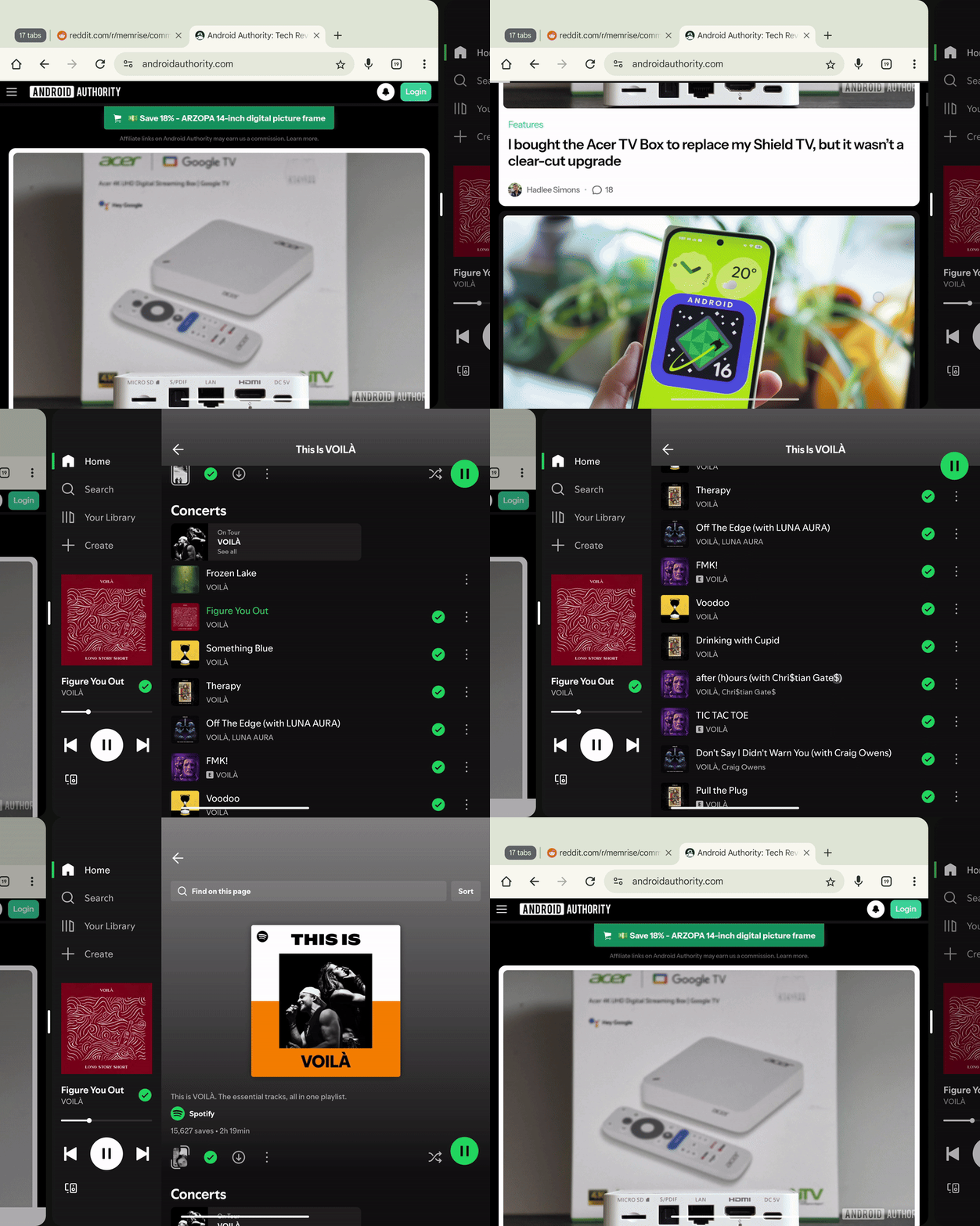
However, my favorite Android 16 feature on the Pixel Fold is the new 90:10 split-screen mode that lets me put two apps side-by-side, one taking up most of the display and the other a small chunk, then instantly switch between them as shown in the GIF above. This makes multitasking a breeze on the large inner display, letting me enjoy reading articles in Chrome on — nearly — the full screen, but also quickly jump to Spotify at any point to control my music. Maps and Chrome while planning trips, Wanderlog and Gmail to manage reservations, Slack and Asana for work, WhatsApp and YouTube when my friends share interesting videos, and so on. It all works so well.
Besides, Android is more fun on larger displays — it has been for years now. Many Google apps are now optimized for larger screens, with side tabs and more on-screen actions. Photos has shortcuts to the archive, trash, and On Device folders from its main tab list; Maps can show a place’s full details and the map side by side; Calendar puts event details next to the full schedule; and Gmail keeps the inbox next to individual email contents. These are only a few examples where having a larger display means seeing more and tapping less. Third-party apps have gotten better, too, like Spotify, Todoist, 1Password, ChatGPT, and Plex. Not all developers have made the effort to adopt a tablet-friendly layout, but this is where Google’s forced aspect ratio does the trick by telling apps they have to go full-screen.
I was also pleasantly surprised to see that the Tensor G2 has held up for most tasks. I didn’t notice any sluggishness while browsing, listening to music, streaming football matches on the train, checking Maps, taking photos, or anything. The camera isn’t the best, but it will provide good shots, including some decent telephoto results.
Downsides, but not dealbreakers

Of course, not everything was rosy during my Pixel Fold experiment. I remembered and discovered some downsides that might’ve been dealbreakers at the phone’s original launch price, but that are a lot easier to swallow when you consider this as a $560 foldable experiment.
The phone doesn’t open to 180° and lay flat, which was incredibly annoying when I was trying to type a few messages and emails on a train. It kept tipping from one side to another on the meal tray, depending on which Gboard letter I was typing. Here it is next to the Pixel 9 Pro Fold to give you an idea of the small, but significant, opening angle difference in daily use.
The bezels are obviously massive, and the crease is quite noticeable; I don’t mind them, personally, but I know some people do. My only complaint is when I’m trying to hit something in the middle of the display over the crease. It always feels like I didn’t hit my target precisely, but in reality, I always do. It’s just a psychological illusion.
At 283g, the Pixel Fold is also heavier than most recent foldables: The Pixel 10 Pro Fold is lighter at 258g, and the Galaxy Z Fold 7 weighs significantly less at 215g. On top of this, the glossy rim is quite slippery, making it a bit of a risky daily carry for someone as clumsy as me. I haven’t dropped it yet, though. Also terrifying is the cost of repairing the inner display, which is listed at around €760 on iFixit — more than the price of a brand new unit now.
Adding to the fragility, the Pixel Fold is only IPX8-rated and completely vulnerable to dust. You can see the dust creeping around the hinge in the photo below, which shouldn’t inspire confidence for the phone’s longevity. However, it has been going strong for three years, and my unit is actually a second-hand one that was a little battered by its previous owner. The fact that it’s held on this long gives me hope that Google didn’t completely mess up this phone’s long-term use.

More alarming, though, is that the Tensor G2 likes to get a bit hot when you perform more demanding tasks. If I use the Pixel Fold while it’s charging, open the camera a lot while walking and navigating in Maps, or try to do anything while applying an update, the back of the phone gets warm. It hasn’t caused apps to close or any shutdowns, but it’s worth noting in case you know your use cases include a lot of these fringe situations.
Like with most Pixels now, Battery Health Assistance is enabled, but you can turn it off. It’s unclear if the Pixel Fold suffers from the same battery woes as the Pixel A series, but it does use the Tensor G2 and the same thermal DNA as the Pixel 7a, which is part of a swollen battery replacement program. Make of that what you want, but my personal recommendation is to avoid excessive or chronic overheating. If you know you’ll be playing demanding games non-stop, this isn’t the phone for you, even as an experiment.
A cheap and fun way to try foldables
With the price of recent foldables often neighboring the $2000 mark, it’s quite funny to think you could get one today for a quarter of the price. The Pixel Fold is three years older, less powerful, and reminiscent of the earlier generations of foldables in its hardware and design. In terms of usability, though, it still provides 80-90% of the experience of a modern Pixel 10 Pro Fold or Samsung Galaxy Z Fold 7 at a fraction of the cost, literally.
The way I see it is: Are Samsung’s or Google’s newest foldables worth nearly four times an original Pixel Fold? Do they have four times the features? Do they allow me to do four times more work, browsing, or chatting? The answer is obviously no. So this is what makes the Pixel Fold such an interesting deal and a bit of a tech hidden gem for $560.

It can be perfect for someone intrigued by foldables who wants to see how well the form factor works for their daily use, but who isn’t prepared to put down $2000 on an experiment. It could also be a great, affordable secondary phone, providing a larger screen when you need it without breaking the bank, while you use your main device for more intensive tasks and photography. It can also be a more portable tablet replacement for someone who travels a lot or takes long rides through public transit. Whatever the reason, it’s worth looking at the Pixel Fold as a potential answer to many of your questions.

Don’t want to miss the best from Android Authority?
- Set us as a favorite source in Google Discover to never miss our latest exclusive reports, expert analysis, and much more.
- You can also set us as a preferred source in Google Search by clicking the button below.


Thank you for being part of our community. Read our Comment Policy before posting.