Affiliate links on Android Authority may earn us a commission. Learn more.


The Anker SOLIX E10 is the ultimate whole-home backup system
Anker SOLIX E10 Whole Home Backup System
MSRP: $4,299.00
What we like
What we don't like
Anker SOLIX E10 Whole Home Backup System
Many of us have learned to live with power outages in our homes. They are often infrequent and cause no harm, but they can be a nuisance and, more importantly, can occur during bad weather or other conditions that can seriously impact our health and safety — this is especially true in regions where extreme conditions and even natural disasters are more common.
There are many methods for providing temporary or backup power to a home, and power stations with backup systems have become a popular option for many. Looking to go a step further, I installed the new Anker SOLIX E10 Whole-Home Backup System at my property, and it’s one of the best solutions I’ve tested to date.
Not only can the Anker SOLIX E10 provide massive amounts of battery power for your home, but it can also provide unlimited power with its Smart Generator. You can completely eliminate power outages for your entire home, and do so up to 5x more efficiently than older home backup power solutions.
What is the Anker SOLIX E10 Whole-Home Backup System?

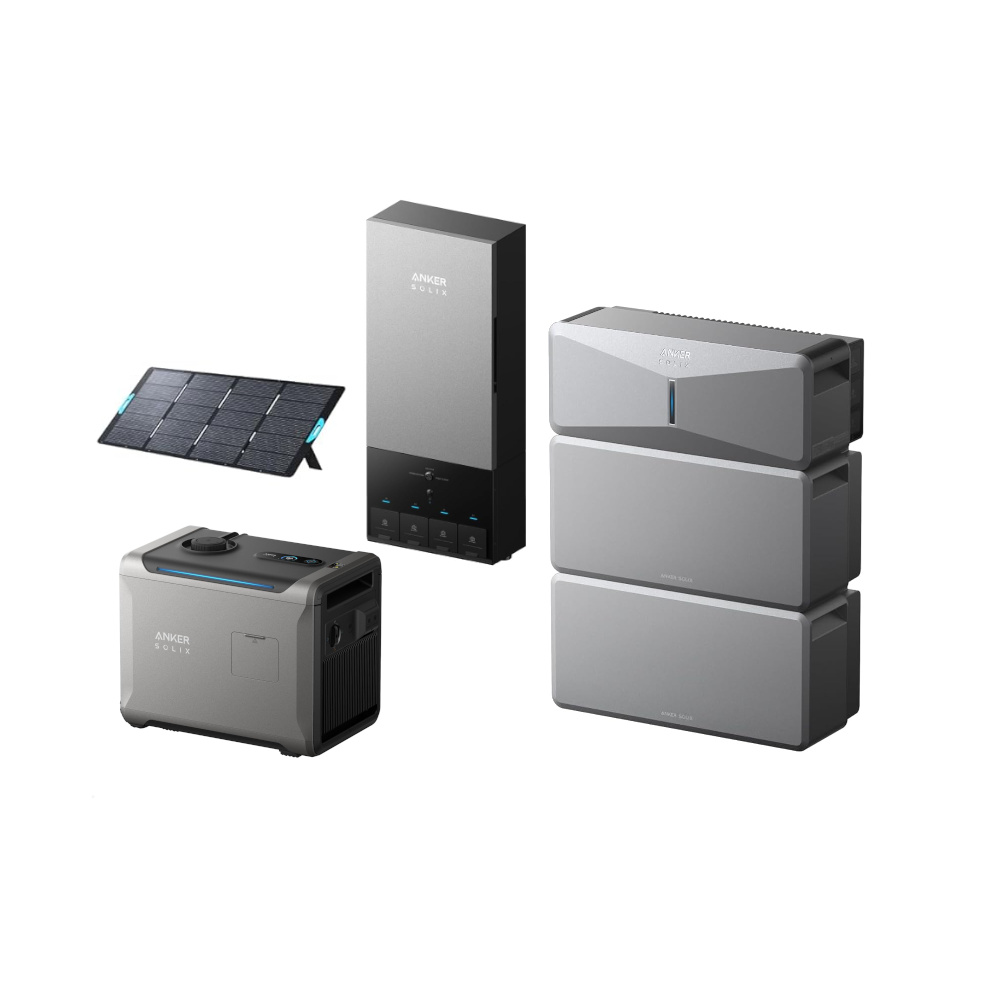
There are a handful of components that make up the Anker SOLIX E10 Whole-Home Backup System. Most of the components can be used independently of each other, but, just like Optimus Maximus, the SOLIX E10 is greater than the sum of its parts when you connect everything together.
To make things as simple as possible, you can think of the Anker SOLIX E10 Whole-Home Backup System as a battery pack system that can plug into your home, and can be extended by a generator.
Battery packs + generator = infinite power?
One key element is the SOLIX Power Module. This is a control station that attaches to the stack of batteries, accepts input from standard generators, the SOLIX Smart Generator, solar panels, and more. It then controls that energy input and can push it directly to attached electronics or into the SOLIX Power Dock, which is wired into your home.

This is all run from batteries that each contain 6kWh of stored energy, and you need a Power Module to connect to that power. The Power Module is able to handle up to five batteries, and the system as a whole can connect up to three Power Modules. This provides you with a massive range of battery storage options from 6kWh up to a maximum of 90kWh per SOLIX E10 Whole-Home Backup System. We’ll explore what those numbers mean later; for now, let me just say that the average household in the US consumes around 30kWh per day.

When used as a standalone system, the Power Module with up to five batteries (up to 30kWh) can be charged by plugging it into the wall, and/or by solar and generator input. It outputs via a proprietary plug with optional adapters that support transfer switches, RVs, or standard AC ports at up to 7,680W max. It has enough oomph to run an air conditioner and other high-draw electronics, but it’s not really made to be a standalone power pack.
The next component is the aforementioned Smart Generator. The generator may appear to be an optional add-on, but it is the critical component that changes the overall E10 system into a legit unlimited power station. The Smart Generator can run on gasoline, propane, or natural gas. It’s as easy as flipping a switch to get between the fuels. The generator is weatherproof, so you can leave it outside ready to go, and it can be controlled via the app, so you can start it without stepping out into the rain or snow.

Used as a standalone component, the Smart Generator can produce 3,600W of AC power and has a standard 120V AC port as well as a 240V RV port (NEMA TT-30R) to power your devices.
Again, while you can use the generator as a normal generator, the “smart” move is to connect it to the Power Module using the proprietary cable. Anker has enabled far greater efficiency through an important power-delivery strategy: the generator pushes DC power to the Power Module. Up to 4,500W of DC power, to be exact.

The next component of the E10 system, the Power Dock, is the piece that takes all that power and connects it to your home. The device consists of two key components: a transfer switch and a smart breaker panel. The Power Dock can be wired into your home without the batteries or generator; it enables remotely controlled circuits, tracks power consumption, and acts as input for third-party solar systems. Entirely overkill as a standalone unit, but still functional.
Individually, the components are capable devices, but together, the true power comes out. As a connected system, you get more than just a bunch of items that you can get power from; you get a full-home power backup system, with <20ms switching when the grid drops, massive amounts of battery storage, and truly infinite power as long as you have fuel for the generator.
Fair warning: plan carefully for your SOLIX E10 system. My system was provided by Anker for testing. I got two batteries, the Power Module, Power Dock, Smart Generator, a floor stand for the battery stack, and all of the required cables. It arrived on three pallets totaling a little over 800lbs.
How does it work?

The key to the Anker SOLIX E10 Whole-Home Backup System is the software functionality and auto-switching in the Power Dock. Solar power, battery packs, and generators are all old technology. What Anker brings to the table is an integrated system that combines these elements, intelligently auto-switches them so you never see downtime, and does so with the utmost efficiency.
The Power Dock offers the smarts here and runs many functions. First, it takes power from the grid. You can either install the Power Dock downstream of your main electrical panel, as I have, or it can act as your main breaker box and connect directly to the grid.

The Power Dock has 12 slots to accept 120V circuits. Some of these can be combined for 240V connections, and there’s a dedicated extra-load connection as well as a combined breaker slot that handles the connection to the Power Module. Of note, circuits 1&2 can be merged and used as either output or input. If you have a third-party solar system, you plug it into the Power Dock in the 1&2 location.
The key to the Anker SOLIX E10 Whole-Home Backup System is the software functionality and auto-switching in the Power Dock.
In terms of software, you can label, merge, and individually power on/off each of the 12 integrated circuits. The true value is the automatic Transfer Switch functionality. When the grid drops power, the Power Dock recognizes this, and within 20ms, it is able to swap from trying to get power from the grid to pulling power from the Power Module. In practice, my lights barely flickered in the transition.

The Power Module is the brains for your non-grid power sources. The directly connected batteries are always ready; there are two 30-450V MPPT solar connectors, and the Smart Generator can be permanently installed and left connected for standby. The battery power is always available to the Power Module. You can control how much capacity to keep for standby, and the rest of the power can be used for daily operations. The batteries rarely sit idle, in part thanks to power management strategies geared toward the long-term health of the system.
Incoming solar power and any power from the Smart Generator can be routed as needed to power the home and/or charge the batteries. In the event of a utility outage, the Power Module pushes stored battery power to your home first. Then, when the batteries drop to a threshold that you define, the Smart Generator kicks in. With up to 4,500W of power coming from the generator, I usually see about half of that pull from my house and the rest is pushed into the batteries. There is no schedule for solar input; it is constantly able to push a charge into the batteries or power the house when the sun is shining.

The Smart Generator has three modes: Quiet, Eco, and Turbo. These are throttle controls for the engine in the generator, which affect both noise levels and power output. Turbo mode can generate up to 4,500W DC, while Eco mode produces around 4,000W DC, and Quiet mode pushes around 2kW. Please note that I only tested with regular gasoline. It is very easy to turn the dial to LP or natural gas, and it’s easy to connect the hose to a propane tank, but natural gas will require a rigid permitted install by a professional in most municipalities.
During the power cycles, integrated circuits in the Power Dock can be made to shut down and turn back on automatically. In the Circuit Backup Strategy, you have three options today: Must Have Circuits that remain powered, no matter what state the system is in. Nice To Have Circuits that remain powered until the battery drops to a level that you decide, then turn back on at a higher level. And finally, Non-priority Circuits that are allowed to drop the moment the grid drops.
When the utility power returns, the Power Dock gives it a minute to stabilize before it switches back to grid power, just in case. Then, once back on grid power, the system returns to normal standby state, turning off the generator if needed, and recharging the batteries back to your specified standby value.
Software and performance
The Anker app is not only your tool for total control, but it is also explicitly required to install and operate the Anker SOLIX E10 Whole-Home Backup System. When you first set up the system, all of the integrated circuits are turned off in the software so that it is not initialized in a state that conflicts with the hardware you have installed.
The home page of the app offers a visual depiction of the connected systems that are currently operational. It also houses graphs of historical power usage.
Diving into the settings, the app offers a long list of features, functions, and configurations to maximize your value from this system. For instance, the Power Usage Scenario tool offers a Time of Use setting. I discussed the Time of Use setting in detail in my Anker SOLIX F3800 Plus review. In short, if your utility provider charges you a higher rate for power at certain times of the day, you can tell the E10 system to charge the batteries during low-rate times and to consume the battery during high-rate times. Avoid paying the elevated rates!
I am also a huge fan of the automated Storm Guard mode. The system connects to a weather service, and if a storm is expected, the system will disrupt your current power strategy and attempt to fully charge the batteries in preparation for an outage.
The settings for circuits provide tools to rename the twelve on-board circuits of the Power Dock, to merge them together if you have a 240V connection, and to access the Circuit Backup Strategy we discussed earlier.
The other setting of note is the Smart Generator control. There are actually two tools for the Smart Generator. If you manually connect to the generator directly in the Devices section of the Anker app, then you can see all of the details, control all of the settings, and check on the health of the generator. In the main settings of the home page of the app, you get to control whether or not the generator should auto-start, select the start level and stop level, and control which operating mode it should use at specific times of the day.
I have set the Smart Generator to operate in Quiet mode from 8PM until 8AM, then Eco mode during the day. I will manually bump up to Turbo mode when and if needed. From there, I’ve set the generator to turn on automatically if the grid is down and the batteries are depleted to 50%, then to turn off when the batteries are charged up to 90%.
This Smart Generator strategy is how Anker claims it has gained up to 5x efficiency over competing systems. Pushing DC power from the generator into the Power Module is one less DC <-> AC conversion that needs to happen. Those conversions are less efficient than we’d all like to admit, and generate a lot of heat. Pushing DC practically directly into the batteries maximizes charging rates.
Your house also remains powered indefinitely as the batteries are never allowed to go empty. The Power Module controls where incoming power goes and what source and amount is pushed back to the Power Dock for your house. I mentioned that when the generator is running, the power is directed into the house, and what is not needed is pushed to the batteries. When my house is running at full steam, I can suck up 4,500W and more, but it usually pulls about 1,500W.
If I drop all low-priority systems, such as the hot water heater and hot tub, I can run on about 700W with my desktop computer, router, the fridge, and a few lights turned on, so I can still work. In that scenario, the remaining ~3,800W can be fed directly into the batteries to charge quickly.
Without shutting down any of my systems, I average a little over two hours to drop the batteries from my standby 90% capacity down to 50% to trigger the generator. It takes roughly another two hours for the generator to bring the batteries back up to 90% and the cycle can continue as long as I keep the generator fueled. This is sort of the point of the Anker SOLIX E10 system: no compromises, just unlimited power for your home!
In a true emergency, I could opt to drop more circuits to extend things. Plainly put, I have calculated that the generator will produce over 16kWh per tank of gasoline when running in eco mode, and my two batteries hold 12kWh of power. That’s enough electricity to power the average home in the US for almost a full day, and the generator only needs to run for 8-10 hours to make that happen.
If you were to install the maximum fifteen batteries, for 90kWh, not only would the average home run for three days before even considering the generator input, but the maximum current draw of 10kW with surge endurance protection means you can run a full 5-ton A/C cooling system without flinching. I had no need for air conditioning during my testing, but my water heater and hot tub combined for nearly 7kW. While drawing those 7kW, the E10 system doesn’t flinch even if I start running my 1,700W air fryer or similar high-draw appliances. For me, this truly is a no-compromise whole-home backup.
Anker SOLIX E10 Whole-Home Backup System review verdict: Should you buy it?

I’m about to talk about the value of the Anker SOLIX E10 Whole-Home Backup System, but let me get this out of the way up front: this is a serious system that is designed for permanent installation. The components are surprisingly compact for what they are, but they are still large and heavy, and require local permits and professional installation. The system taps directly into the power system of your home and is mainly intended for a set-it-and-forget-it configuration.
If that sounds daunting, but you still want a full home backup system, consider the SOLIX F3800 Plus ($3199 at Amazon). It’s far more compact, is technically portable (thanks to the wheels and handle), can accept solar and generator input, and offers greater functionality without needing a permitted and permanent install (though there is a permanent install option available). Alternatively, there are plenty of other options for essential home backup, too. Check out our guide for more options.

But back to that main question: is the Anker SOLIX E10 Whole-Home Backup System worth it? The answer is complicated. I am extremely happy with the system; it very effectively powers my home, and I am extremely grateful that I have not had to reset any clocks or worry about losing heat in the cold months. I think the system is affordable, all things considered, and I will absolutely get value out of it in the long run.
However, that value comes at the cost of a high initial fee. The Anker SOLIX E10 system starts at $4,299 at full retail price for the core unit. The two-battery installation in my home, with Smart Generator and Power Dock, plus installation fees from my local electrician, cost a little over $10,000 in total. Anker also provides installation services, making it super easy to get the E10 system installed in your home (Disclaimer: The installation was provided as part of a sponsorship campaign for the video embedded at the top of the page. This written review is not sponsored, and Anker SOLIX had no say over the content or copy approval).

The B6000 battery module typically retails for $2,499. These are automotive-grade batteries with a rated 10-year lifespan. You can connect up to five batteries per Power Module, for a total of 15 batteries. The Smart Generator’s price fluctuates, and I’ve seen it range from $1,600 to $2,899. I suspect you see that the price can add up for your full install.
However, the Time of Use configuration and solar input can provide significant savings for you in the long run. Anker says that some users can reduce their utility bill by up to 80% with the right configuration of the E10 system.

In my world, folks hear the words “solar” and “backup” and they always ask me if this system will eventually pay for itself. The answer is, economically speaking, this system may one day pay for itself, but that’s not the point. The point is that my wife and I work from home, we rely on electricity to heat and cool the house, for hot water, our car can get trapped in the garage without power, and we’ve lost a full fridge’s worth of food twice due to power outages.
I didn’t install the Anker SOLIX E10 Whole-Home Backup System to turn a profit; it’s here to ensure I never have to compromise my health, safety, or the conveniences of my technologically connected life due to power outages. So while it is a hefty expense, it’s hard to put a price on a home backup experience that’s this good.
- Highly configurable
- Infinite backup power
- Installation arranged by Anker
- Many standalone components
- Can be very expensive
- Requires professional install
Thank you for being part of our community. Read our Comment Policy before posting.