Affiliate links on Android Authority may earn us a commission. Learn more.
The Timekettle LiveTalk earbuds can play audio, translate, and help you learn a language
Oct 21, 2026 — 9:35 AM ET



Is the language barrier about to be conquered? At the very least, we seem to be closer. Technology and AI are bridging cultural gaps, thanks to devices like the Timekettle LiveTalk. These seemingly normal earbuds do more than play audio; they can also translate it, and they work with 54 languages.
I’ve been playing with the Timekettle LiveTalk for a couple of weeks now. Am I feeling like a polyglot, or does the industry still have some work to do before live translators become a thing of the past? Keep reading to find out!
A bit about the Timekettle LiveTalk AI Translation Earbuds

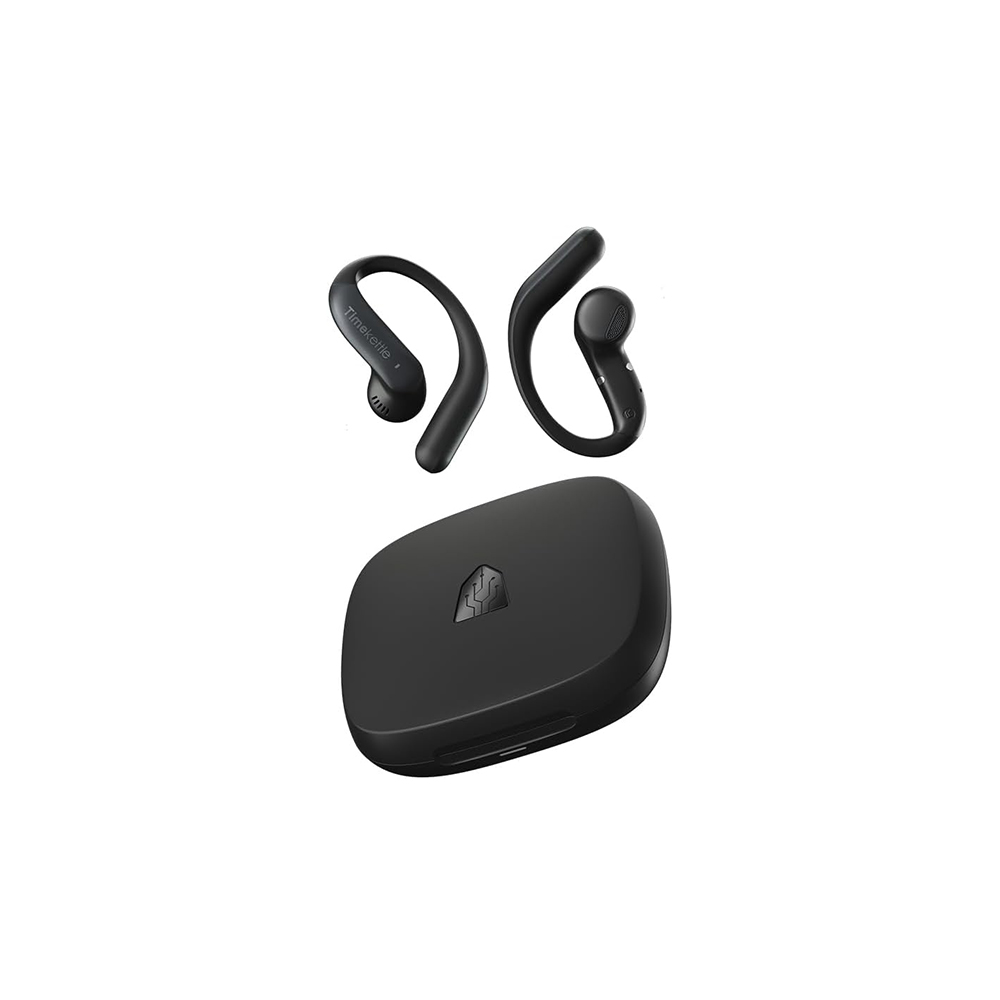
On the surface, the Timekettle LiveTalk AI Translation Earbuds look like regular earbuds, and they are technically that too. You can use them as standard open earbuds to listen to your tunes, podcasts, YouTube videos, streaming videos, and more. As headphones, these are nothing impressive; you can definitely get better standard buds at this $129 price point. That said, they sound good, are comfortable for long-wearing sessions, and have a great 8-hour battery life (just playing audio), with the case extending that to 35 hours in total.
The Timekettle LiveTalk earbuds can become your only headphones for listening, translating, and more — just don't expect amazing audio quality for your tunes.
Of course, you’re not getting these just to listen to audio. The words “AI Translation Earbuds” are in the name, after all. The Timekettle LiveTalk can translate between 54 languages and 108 accents. These do require a Bluetooth connection to your phone and a data connection for most features, but they offer 25 language pairs for offline translation if needed.
How was my experience using the Timekettle LiveTalk AI Translation Earbuds?

This all sounds very amazing, but sadly, specs and features don’t always translate to a great user experience. I did a good deal of testing, so let’s go over my experience together.
There are four translation modes
So, all translation features are accessed through the Timekettle app, which has four translation modes: ‘Face to Face’, ‘Live Listening’, ‘Voice Call Translation’, and ‘Multi-Media Translation’. Let’s go over each, give you a brief explanation of what it does, and tell you how well it worked for me.
Face to Face
- Translates in-person conversations between two languages.
Face to Face is the best option for live interactions. This is what you’ll use most, for example, while traveling or during multilingual conversations in person. You can use it to ask for directions, order coffee, or find the bathroom.
There are two ways to do this. My favorite is to give one earbud to each speaker; then you can choose which language each user will speak. Once you hit ‘Start’, you can each start talking, and Timekettle will translate everything you say and play it back to the other person in their own language.
This worked very well for me. All the AI improvements make a difference. I have previously used the Timekettle X1 Meeting, which mainly works offline. The Timekettle LiveTalk earbuds require an internet connection, which can be a hassle if your GBs are scarce, but it also makes translation much better. The difference is significant, and the LiveTalk is much better at translating most words and expressions. Of course, there are still some colloquial expressions and slang that it struggles to decipher, but the few mistakes aren’t as glaring. The AI voice also sounds much more natural.
The other option is to wear both earbuds and have the second speaker use the phone. This is better for quick questions and requests. No need to swap headphones if you just need to communicate something quickly and be on your way.
Live Listening

- Translates live presentations, speeches, and meetings using the phone’s mic as the audio source.
If you can hear it out loud, the Live Listening mode can translate it. Simple as that! I haven’t been in any meetings lately, but I tested this by playing some online videos on my computer, and it works just as well as the Face to Face translation. Again, there were small mistakes here and there, but they weren’t major.
One important thing to keep in mind is that there will be a bit of a delay, especially if the speaker uses long sentences or speaks quickly and constantly. I constantly noticed that the translation voice was about 10-15 seconds behind the actual speaker. This means that, for example, if there are any visuals being presented, you will see them before you actually know what the person is saying about them.
The desynchronization can get a bit confusing, but the good news is that Timekettle keeps up and eventually delivers the translation, albeit a bit delayed. It’s not necessarily a deal-breaker and is likely the nature of AI translation for now, but it is definitely something to keep in mind. You’ll be a bit behind those who actually know the language.
Voice Call Translation

- Translates phone calls, and it works with internet calls, too.
Now, if I must complain about any of the modes, it will be this one. Mainly because it is the only mode I had any issues with. More specifically, I had issues using the stock Phone app on an iPhone. The app wouldn’t translate, or it would take a long time to do so. Seriously, like, it wouldn’t translate for 2-3 minutes, then start translating randomly.
I looked into this further, and it turns out it was all about conflicts with iOS and its security/privacy features during calls. I guess “it’s not a problem, but a feature.” Anyways, this is only a problem with the stock Phone app for iPhone, and not all the time. Sometimes, randomly, it would also work perfectly.
The good news is that using voice calls via WhatsApp, Messenger, and Discord, everything works perfectly. Likewise, I tested it on an Android phone with zero problems.
If it’s working, it works very well. Again, the Timekettle LiveTalk is very good at translating everyday conversations, though it can get a bit stuck when people start speaking more casually, using slang and such. You can easily direct people to enunciate more clearly while maintaining a more official tone.
The Timekettle LiveTalk is very good at translating everyday conversations, though it can get a bit stuck when people start speaking more casually.
Another thing you’ll have to tell people you call is to get used to silent moments. For example, when someone spoke to me in Spanish, it would feel like a long silence to them right after. This is because I would be listening to the translation, and the person on the other side of the line can’t hear that. The same doesn’t apply on the Timekettle user’s side. The person I am talking to can hear me speak, and then the translation plays on both sides, leaving no silent moment.
I have the option to turn off my voice so the person on the other end of the call can hear only the translated words, not my actual voice. It’s a cool feature, but I feel like that also creates even longer silent moments, making the conversation a bit awkward.
In summary, there will be long silences, especially for the person on the other side of the call. As long as both parties understand this and are patient, the Timekettle LiveTalk will translate efficiently with very few mistakes.
Multi-Media Translation

- Translates any audio your device is playing.
Now, here’s the translation mode I use the most. The Multi-Media Translation mode is pretty self-explanatory. It is meant to translate any content you play on your device, whether it is a YouTube video, an international Netflix movie you absolutely want to watch in its original language, or even locally stored videos.
The experience was also the most seamless in this mode. Because it picks up audio directly from the device, it captures every detail with greater accuracy. In fact, you can lower the volume all the way down, and the translation still works perfectly.
Again, keep in mind there is still a delay of about 10 seconds. Of course, it still gets a few things wrong here and there, but it’s much less common, likely because it takes in audio natively rather than physically listening for it through the mic.
I also used it a bunch while watching English-language movies with my girlfriend. She is still learning the language, and not all movies on streaming platforms have Spanish audio or subtitles. The Timekettle LiveTalk made it easier for her to understand everything, and because she could still hear the original audio, it served as practice.
Some extra thoughts on the Timekettle LiveTalk

While most of the information was already covered in the sections above, I feel there are some interesting aspects of the Timekettle LiveTalk that also need to be addressed. While these capabilities don’t take the spotlight, they can be really cool and functional.
These can actually connect to two devices at once
For starters, there is a feature called Dual Connection, which you can enable in the app. In essence, this allows you to use the earbuds to listen to two devices at once. In my case, I used them with my smartphone and my laptop. The earbuds can translate audio from either device. You still need the smartphone app to manage translation, so it requires an initial connection to the smartphone to function properly. That said, Dual Connection is still a really cool feature that even dedicated headphones mostly lack.
The Timekettle LiveTalk earbuds can connect to two devices at once, something most high-end headphones lack.
You can practice new languages with an AI instructor
Then, after digging a bit into the app, I found out the Timekettle LiveTalk’s job isn’t just translating between a bunch of languages. These earbuds can also help you learn another language! In the settings, there is an AI Lab section, where you can find an AI Language Tutor option. Go in there, and you can start practicing a new language with an AI character.
The AI can roleplay with you and act like you’re buying a coffee, having a conversation at a library, or in a job interview. It also has an airport conversation mode and a date simulation. If you just want to chat away about random subjects, you can use the ‘Free dialogue’ mode.
Need to practice a new language? The Timekettle LiveTalk AI features can help with that.
This is still an experimental feature, so it’s only available in English, Spanish, and Chinese. It’s looking very promising, though, and it’s a really cool way for my girlfriend to improve her English without having to talk to me or random people all the time.
Here, you can also look at AI summaries of your other translation activities. There is also a Personal Dictionary and a few other options you can play around with.
Offline translation

The Timekettle LiveTalk earbuds require a connection for most of the main features, but it’s not necessary if the language pair you need is available for download. There are 25 languages available for offline translation, including the most popular ones such as English, Spanish, Chinese, Russian, Korean, and Japanese.
I downloaded the English/Spanish language pack and tried it a bit. It works well, but it can be less accurate than the normal live translation. Additionally, the voice reading out the translation will become much more robotic. The data-connected AI enhancements do much of the heavy lifting to make the voice sound more human. Of course, paragraph organization will also suffer, and, in my experience, translating can become a bit slower.
Regular translation beats offline translation with the Timekettle Live Talk, and by a landslide. That said, data can be a luxury when traveling abroad, and you may sometimes find yourself in areas or buildings with poor reception. There’s also the fact that offline translation is free! More on that in the next section.
What’s the cost?

Nothing in life is truly free, right? Especially when it requires server resources and continuous AI technology. The same applies to the Timekettle LiveTalk, but at least you get some functionality without having to pay a monthly subscription. If you’re a light user, you can easily get by with the free plan.
The free Timekettle plan gets you 200 minutes of live translation per month. This is used up every time you use the Face to Face, Live Listening, Voice Call Translation, and Multi-Media Translation modes. It will literally count the time and take it off your allotment.
Most of us can use the Timekettle LiveTalk earbuds without paying a cent.
It’s enough for a few meetings a month. You can watch a movie, too, or maybe make a bunch of calls abroad. If you think about it, it’s three hours and 20 minutes of translation time. That should be enough to cover my needs in an average month, and the ‘AI Labs’ features are free, so my girlfriend’s hours of English practice won’t be an issue. Oh, and as mentioned above, offline translation is free, too. If you don’t mind slightly reduced efficiency and a less natural voice, it works pretty well, and you can use it for simpler translations to avoid spending your precious minutes.
If you need more, Timekettle offers a few subscription plans.
Timekettle LiveTalk plans:
- Unlimited: $9.99 monthly or $99.99 yearly.
- Pro (+300 minutes a month): $5.99 monthly or $59.99 yearly.
- Booster Pack (600 minutes): $12.99.
These prices don’t seem outrageous if this is actually a product you’ll be using. Especially if it’s for work. And if you’re using it inconsistently, such as when traveling, you could just pay for one of the plans or a Booster Pack during your trips.
Should you buy the Timekettle LiveTalk?

After using a few of these AI translation devices, I keep asking myself whether it is worth getting one. After all, there are apps that already translate conversations very well. The most obvious one is free: Google Translate. It works very well and also supports 249 languages, dialects, and regional varieties. It also has offline capabilities, and all you need to use it is your phone.
Many can get by just fine with Google Translate, but demanding users can thrive with the Timekettle LiveTalk.
With that in mind, who is the Timekettle LiveTalk for? Sure, most of us can easily get by with just Google Translate, but are we getting the best experience? People who need translation often care about the details. Something like the Timekettle LiveTalk earbuds will offer a more seamless experience. Maybe Google Translate can replace the Face to Face and Live Listening modes, but it can’t natively translate in-device audio or voice calls with the same ease. It’s a multifaceted device that gives you options and reduces friction.

Of course, the Timekettle LiveTalk earbuds also double as regular headphones. If you’re already thinking of spending a good amount of money on a pair of open earbuds and value translation features, why not just go with the Timekettle LiveTalk and keep your options open? They are comfortable, sound good, and have great battery life, after all. They can even connect to two devices at a time! And when you need translation, they are ready for you. Not to mention, they can help you practice another language and take AI notes for you.
The language barrier already makes for awkward situations. You don’t want to make it worse. Certainly, the hands-free nature of the Timekettle LiveTalk helps with that. If you’re constantly dealing with other languages, the investment becomes much more worthwhile.
Thank you for being part of our community. Read our Comment Policy before posting.