Affiliate links on Android Authority may earn us a commission. Learn more.
Gaming on the Pixel 11 is a mess, and I traced it to one hidden setting
Sep 21, 2026 — 6:00 AM ET
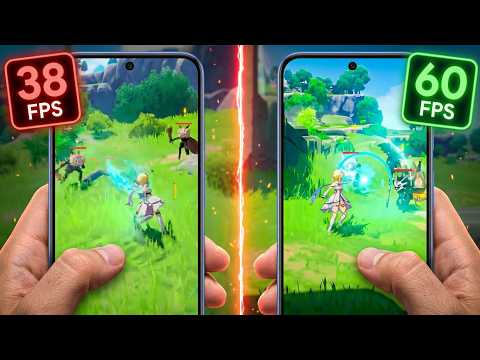


The Pixel 11 series hasn’t gotten off to a great start for gamers. Gameplay performance is about as hit-and-miss as everyone expected, and the phone has struggled with graphical glitches and reported microstuttering issues in popular games like Genshin Impact.
I went back to play the game again this week and indeed noticed significant jank and freezing that hadn’t appeared during my initial playthrough and were far worse than anything I’d seen in previous tests on my Pixel 10 Pro XL. Perhaps Google changed something between its August 2026 and September 2026 patches, which were aimed at addressing performance issues and graphical glitches.
Curious, I dug into some of the lower-level details. It turns out Google has made an even more significant change to the Pixel 11 series than its PowerVR CXTP GPU in the Tensor G6 — it’s made ANGLE the default OpenGL ES implementation. Google has been pushing Vulkan and ANGLE for years now, but the Pixel 11 series is its first phone to use ANGLE as the default implementation when OpenGL ES is required. To prove this, I toggled on Android’s “show ANGLE toast” in Developer Settings, then launched a few games.
What is ANGLE, and why is it such a problem for Pixel 11 gaming?
| Pixel 11 Pro XL | Pixel 10 Pro XL | |
| Asphalt Legends | Uses ANGLE | No |
| Call of Duty Mobile | Uses ANGLE | No |
| Genshin Impact | Uses ANGLE | No |
| Dolphin Emulator | Uses ANGLE | No |
If you’re not familiar with ANGLE, it’s a compatibility layer that implements OpenGL ES on top of Vulkan. In other words, an OpenGL ES game can continue making OpenGL calls while ANGLE translates them into Vulkan commands for the underlying GPU driver. Even if a game engine primarily uses Vulkan (such as COD Mobile), ANGLE can still be called in for parts of the rendering pipeline that use OpenGL ES, meaning a game doesn’t necessarily have to be entirely OpenGL ES-based for ANGLE to be involved. In theory, this can enable improved performance on modern GPUs while still supporting games and emulators built on OpenGL ES, but the main aim is to standardize the implementation and compatibility across Android devices.
This same menu that toggles the toast also offers the option to change ANGLE preferences on a per-app basis, allowing the system to decide or force ANGLE or “Native,” which reverts to standard OpenGL calls. To investigate whether this switch to ANGLE was contributing to the excessive janks and judders, I re-ran Genshin Impact with the feature disabled. The results are striking.

Running with ANGLE enabled, which is the default state on the Pixel 11 Pro XL, produces far more variable frame times, with repeated large janks and microstutters throughout the playthrough. Switching to native OpenGL doesn’t eliminate all frame-time variation — the game still isn’t locked to 60fps — but the large spikes are dramatically reduced, with even the worst frame time in my test remaining below 100ms.
This isn’t definitive proof that ANGLE is a universal problem for the Pixel 11 series — it could be a Genshin Impact-specific issue, especially since Google has had problems with this title in the past. Plus, it’s worth remembering that many titles now prefer or are exclusively on Vulkan. I’ll be sure to test a range of other titles and emulators to dig a little deeper.
Disabling ANGLE makes Genshin Impact far smoother on my Pixel 11 Pro XL.
In any case, ANGLE appears to be a significant contributor to Genshin Impact’s microstuttering on my Pixel 11 Pro XL. The problem is particularly noticeable when the game encounters rendering effects it hasn’t recently displayed, such as new animations, enemy models, or particle effects.
That behavior is interesting because ANGLE isn’t simply adding a fixed amount of overhead to every frame. It has to translate OpenGL ES’s state and shader model into Vulkan, whose rendering pipeline is considerably more explicit. If new combinations of shaders or rendering state have to be prepared as they’re encountered, that additional CPU or driver work could cause an individual frame to miss its rendering deadline, resulting in microstutters and jank rather than lower average frame rates.
I haven’t been able to establish that pipeline compilation is specifically responsible for every hitch, so this remains a likely explanation rather than a confirmed root cause. However, the combination of ANGLE being enabled, the large frame-time spikes disappearing when it is disabled, and the stutters being particularly noticeable when new rendering effects appear makes the ANGLE-to-Vulkan path the most obvious place to investigate.
How to fix Genshin Impact microstuttering

Google has been moving toward an OpenGL ES-on-Vulkan architecture for several years, so the Pixel 11’s change appears to be part of a broader Android graphics strategy rather than a Pixel-specific experiment. The unfortunate part is that, at least in my testing, the transition doesn’t appear to be completely transparent across all workloads.
If you’re experiencing microstuttering or jank in a particular game on your Pixel 11, it’s worth trying the native OpenGL option. It won’t necessarily improve performance in every title, but in my testing of Genshin Impact, it dramatically reduced the large frame-time spikes. To do this, you need to enable Developer Options (Settings -> About Phone -> tap Build Number to unlock) and scroll down to the option marked ANGLE Preferences.
You can pick any app installed on your phone and choose between default (ANGLE on the Pixel 11), force ANGLE, or go back to “native” to run OpenGL the old-fashioned way. Unfortunately, this isn’t a global option to revert to OpenGL classic en masse.
Let’s hope Google can address this problem in an update in the not-too-distant future.
Conversation
Read what readers said or add your take.