Affiliate links on Android Authority may earn us a commission. Learn more.
One UI 9 fixes one of Samsung DeX's most annoying taskbar regressions
Oct 13, 2026 — 4:41 AM ET



- One UI 9 restores a built-in option to hide the taskbar on Samsung tablets that disappeared with One UI 8.
- In standalone DeX, the setting can hide both the taskbar and status bar, while external-display DeX can hide the taskbar.
- Samsung is also adding more freedom to position the regular tablet taskbar on the left, center, or right.
Samsung’s switch to the new desktop mode in Android 16 came with a frustrating side effect: several familiar DeX controls disappeared in One UI 8. Samsung has gradually been putting some of those pieces back, including an auto-hide taskbar option that returned on phones with One UI 8.5. But tablets were conspicuously left out, and now One UI 9 appears to finally close that gap while adding another useful taskbar trick.
A Reddit user testing a Samsung Galaxy Tab S12 Ultra has found that One UI 9 restores the option to automatically hide the taskbar on tablets. Better still, the setting works directly on the tablet rather than being limited to an external monitor.
In standalone DeX mode, enabling the option hides both the taskbar and status bar, freeing up more screen space until they’re needed. When the tablet is connected to an external display, the option also hides the DeX taskbar on the external display. One UI 8.5 users could achieve something similar through Samsung’s MultiStar Good Lock module, but One UI 9 brings the behavior back as a built-in setting.
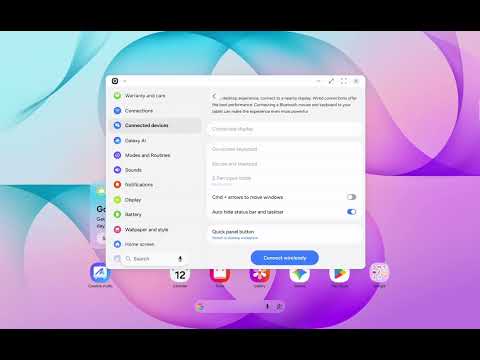
The change effectively restores functionality Samsung removed during its transition away from classic DeX in One UI 8. Phones regained the external-display taskbar toggle in One UI 8.5, while tablets had to wait until now.
Samsung is also giving tablet owners more control over where the regular One UI taskbar sits. The Reddit user also found that with gesture navigation, One UI 9 lets you position it in the center, left, or right. Three-button navigation limits choices based on where the navigation buttons are placed, preventing the two sets of controls from competing for the same space.
That positioning option doesn’t carry over to DeX, where the taskbar remains centered. The existing recent and suggested apps behavior also appears unchanged.
There’s one important caveat: Samsung has not yet broadly released stable One UI 9 for its tablets. So while these features appear functional on the new Tab S12 Ultra, we’ll have to wait for the public rollout to see whether Samsung ships them unchanged.
Thanks, Dylan H, for the tip!
Thank you for being part of our community. Read our Comment Policy before posting.