Affiliate links on Android Authority may earn us a commission. Learn more.
Google Messages tests a full-screen attachment view and customizable grid
Aug 3, 2026 — 9:39 AM ET



- Google Messages v20260731 beta lets users reorder attachment pills (such as Location, Gallery, and Schedule Send) by long-pressing and dragging them.
- While shortcuts cannot be completely removed, pushing unused options to the bottom allows for a personalized messaging layout.
- A new caret (arrow) icon situated at the top of the attachment sheet expands the grid into a full-screen view when tapped.
Google is giving Google Messages users a long-overdue bump in daily usability: you can now rearrange the shortcuts inside the attachment sheet. Spotted in Google Messages v20260731 beta, this quality-of-life upgrade arrives as Google continues tweaking its primary chat client to make it easier to use.
Until now, tapping the attachment icon in an ongoing conversation opened up a fixed grid of options, ranging from Gallery and Location to Magic Compose and Schedule Send. With the new beta update, users are no longer stuck with Google’s default arrangement. You can simply long-press any shortcut pill to rearrange it to a preferred spot in the grid.
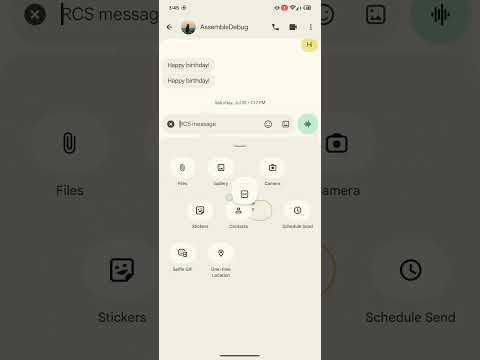
Since everyone uses messaging apps differently, a user who frequently shares their live location can drag that shortcut to the top row, while someone relying on Schedule Send for work can prioritize it for instant access. You still can’t remove shortcuts completely, but pushing your least-used options to the bottom makes the grid feel far more tailored.
Alongside the shortcut rearranging functionality, Google has given the attachment sheet a small visual touch-up. The sheet now features a caret (arrow) icon situated right at the top.
This isn’t just a cosmetic change either. Tapping the caret expands the attachment sheet into a full-screen view, making it easier to view and manage all available options at once.
Coupled with other recent upgrades like the Google Messages search update, these incremental UI changes go a long way toward making Android’s default messaging experience feel a bit more customizable.
Conversation
Read what readers said or add your take.