Affiliate links on Android Authority may earn us a commission. Learn more.
Google Home users are watching their carefully organized rooms fall apart
Oct 13, 2026 — 5:06 PM ET



- Some Google Home users say devices assigned to rooms are suddenly appearing under “Linked to you” instead.
- The devices often still show their correct room assignments in settings, suggesting a syncing or display bug rather than lost configurations.
- No confirmed fix exists yet, and Google hasn’t publicly acknowledged the issue.
Apple is spending today showing off its shiny new smart home hardware, which is bound to leave Google Home users wondering when Google will make its next big move. For some, though, new gadgets are probably the last thing on their minds — they just want the devices already in their Google Home app to stay where they put them.
Over the past week, some Google Home users have reported that devices previously assigned to rooms are suddenly being dumped into the app’s “Linked to you” section. The strange part is that Google Home still appears to remember where those devices belong.
The screenshot below shows lights, smart plugs, and other devices piled into “Linked to you,” even though the user says they were previously organized in separate rooms.

A separate screen recording shows the Google Home app loading devices before a large collection appears in that section instead of their assigned rooms:
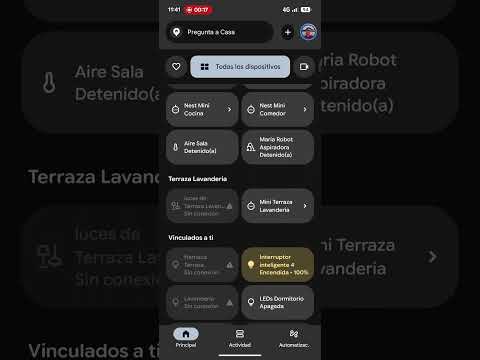
Reports suggest this isn’t limited to a particular brand of smart home gear. Users mention Kasa devices, generic switches and bulbs, Tapo products, and Google devices. Several also say opening an affected device’s settings still shows the correct home and room assignment.
That makes this look more like a Google Home display or syncing problem than devices actually being removed from their rooms. Some users say force-closing the Android app temporarily restores the proper layout, while others have seen devices move back on their own before disappearing again. Reassigning devices or clearing app data hasn’t reliably fixed it either.
There’s also some suspicion that Google Home’s Public Preview could be involved. At least one user said leaving it restored their rooms, although it’s too early to call that a permanent workaround.
We couldn’t find ant public acknowledgment from Google, so we’ve reached out to ask whether it’s aware of the issue and see if a fix is coming. We will update the article if we hear back.
Thank you for being part of our community. Read our Comment Policy before posting.