Affiliate links on Android Authority may earn us a commission. Learn more.
These 3 upcoming Gboard tweaks could make the app even better
Jun 29, 2026 — 9:07 AM ET



- Google is working on several new tweaks for Gboard that could make the app much better.
- Gboard could get a toggle to let users long-press the spacebar to switch to cursor mode, and a slider to adjust emoji sizes.
- It could also get a new layout with full-sized keyboard keys.
Google seems to be working on some welcome new features for Gboard on Android. The keyboard is already packed with useful features, and the company is working on adding new ones. While taking a look at Gboard beta v17.7.4.932364120, we were able to get hands-on with several new features that could make the Android keyboard much better.
You’re reading an Authority Insights story. Authority Insights brings you all the latest exclusive reports, app teardowns, leaks, and in-depth tech coverage from the Android Authority team that you won’t find anywhere else.
Back in February, we reported that Google was working on adding a cursor mode to the keyboard. While that feature isn’t enabled yet, it’s clear that Google is still working on it. We were able to enable a new Gboard setting to toggle the “Long press for Trackpad” feature. If this toggle is enabled, you will be able to long-press on the spacebar to switch to cursor mode. Otherwise, you will be able to swipe on the spacebar to control the cursor.

This option is great because it means that the new feature will be entirely optional. If you don’t want to use the trackpad in Gboard, you will be able to disable it and use your keyboard normally.
We also reported a few months ago that Gboard could soon scale emojis based on your font size setting. However, it seems Google isn’t going forward with that option. Instead, in the latest beta, a new setting is in the works that lets you customize emoji sizes independently.
We managed to enable a slider that controls the size of emojis, thereby changing how many can be shown in a single row. This can be adjusted between five and nine. There are also two special options: “7+” and “8+”. With these options, the number of emojis stays at seven or eight, respectively, but the emojis are slightly larger.
Lastly, Google is working on a feature that will display full-fledged physical keyboard keys on devices. It will likely be enabled or disabled using the “Show accessibility layout” setting. This setting is currently unavailable in the beta, but we were able to get it working with some tinkering.
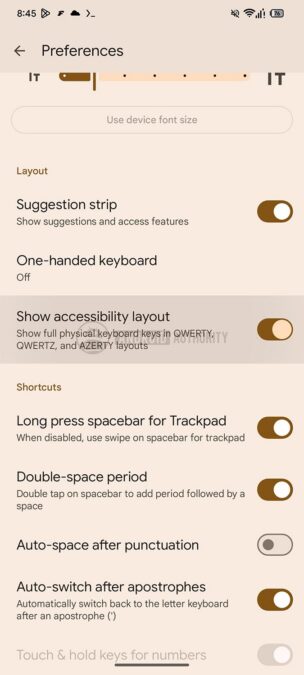
With this enabled, Gboard can display full keyboard-style keys in three layouts: QWERTY, QWERTZ, and AZERTY.

With full-sized keyboard keys, things get quite messy on a phone’s narrow display. It’s possible that this is a feature aimed primarily at Android tablets, and maybe even Googlebooks. It wouldn’t make much sense as a smartphone feature, but it could be useful in Pixel’s Desktop Mode.
Google is still working on these features, and we can’t be certain when (or if) they will roll out to users. We will keep you updated with any new information when we spot it.
Thank you for being part of our community. Read our Comment Policy before posting.