Affiliate links on Android Authority may earn us a commission. Learn more.
Prepare your thumbs: Google shows off Android 17's foldable gaming mode in action
Jun 25, 2026 — 5:33 PM ET



- Google has revealed Android 17’s foldable gaming mode in action, showing how it tackles one of the biggest pain points of gaming on foldable phones.
- The feature splits the inner display in half, keeping gameplay on the top screen while turning the bottom half into a dedicated virtual gamepad.
- Players can customize the controller layout, size, theme, button positioning, and haptic feedback to better fit different hand sizes and play styles.
Foldable phones have always faced a huge ergonomic wall when it comes to mobile gaming. Sure, opening a device to discover a huge canvas makes open-world environments and shooters look fantastic, but actually holding a square-ish slab and stretching your thumbs over that expanse to reach touch controls is a recipe for instant hand cramps. Unless you carry a dedicated Bluetooth controller in your pocket at all times, that extra screen real estate often goes to waste.
Google wants to change that friction. Android Community Engagement Manager Mishaal Rahman has given a full sneak peek into Android 17’s foldable gaming mode over on Reddit after a short initial announcement on June 16.
In the past, the only way to get a working controller experience on a foldable was to use third-party key-mapping apps or pray that a developer created a custom split-screen layout just for your specific phone. Usually you were forced to use standard touch controls that were poorly scaled to fit an inner panel. That’s where Android 17 comes in, changing this approach by baking a fully customizable, system-level virtual gamepad directly into the core Android Open Source Project (AOSP) code.
The idea is simple. Open your phone, and the operating system splits your inner screen into a clean 50/50 layout. You have a full-screen view of your game running in the top half with no obstructions whatsoever, and the entire bottom half becomes a dedicated virtual gamepad.
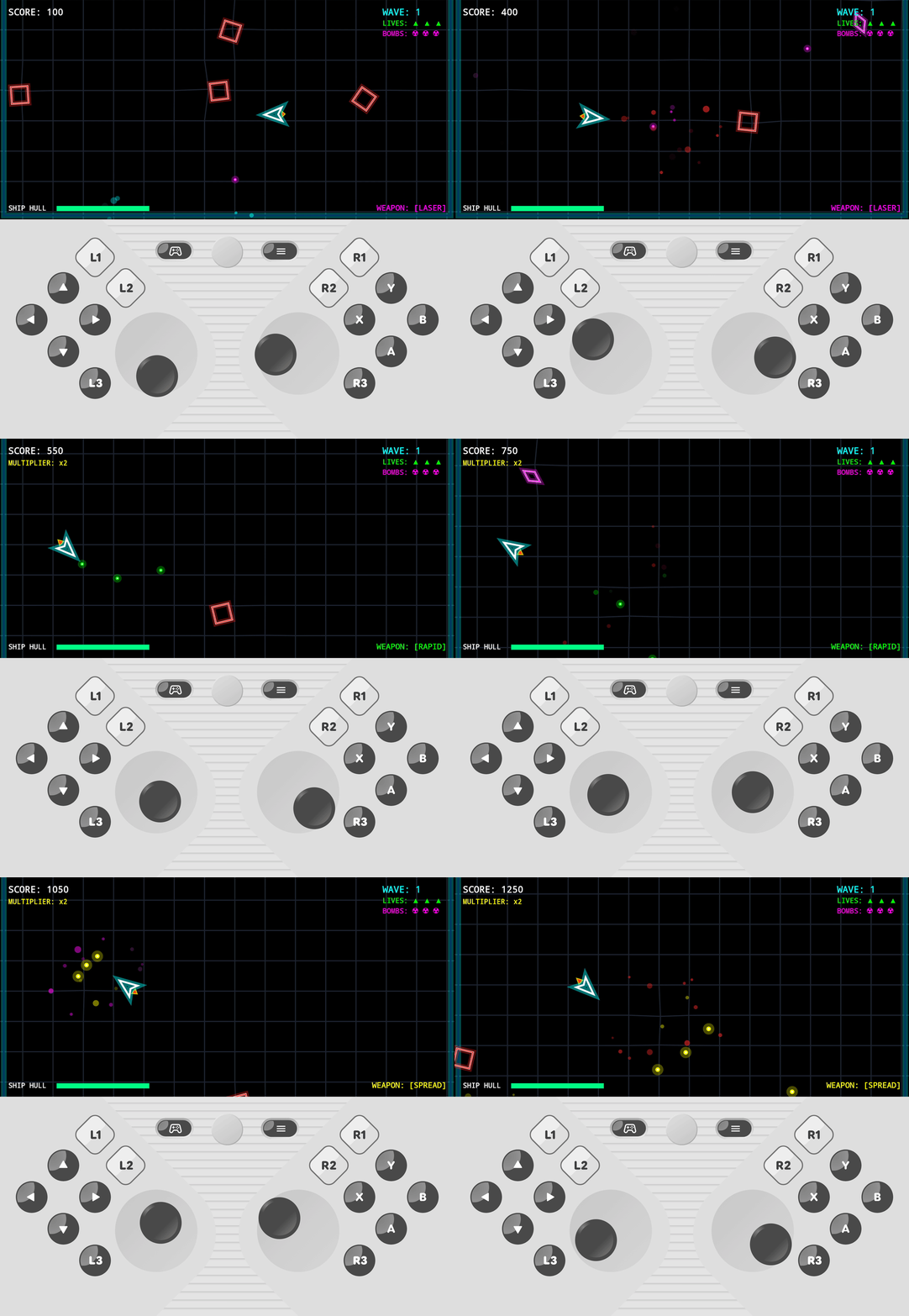
The best part of this execution is how it works with your game library. The virtual gamepad simulates hardware button presses at the system level rather than mimicking normal screen touches. It works natively with any game that already has standard controller support because it tricks the software into believing that you have a physical controller attached.
You get the full complement of inputs you’d expect to see on a traditional console setup, with twin thumbsticks, a regular D-pad, A, B, X, and Y action buttons, a Start button, and full support for three tiers of shoulder buttons (L1/L2/L3 and R1/R2/R3).
Google is not taking a one-size-fits-all approach to the controller layout either. You can dive into deep customization options by tapping the game controller icon on the overlay. If the default “Twin stick, Inline” setting is a little cramped for your hands, you can select “Twin stick, Staggered” and shift the left thumbstick, D-pad, and shoulder buttons to better suit your thumb. You can also scale the overall sizing of the pad between small, medium, and large; toggle between clean light and dark visual themes; and flip a quick toggle to activate haptic feedback for simulated physical button clicks.
The overlay is handled smoothly. If you prefer to play a touch-only title that utilizes the whole inner screen, you can easily minimize the pad with a “Hide Gamepad” button built into the built-in menu or just turn it off completely through your main system settings, Rahman notes. The virtual gamepad is smart enough to move out of the way on its own the second you connect a real controller with Bluetooth or USB-C.
Since this is a platform-level feature built into AOSP itself, individual phone manufacturers can take this base code and customize it to their specific hardware dimensions. Foldable gaming mode is likely to be released widely in the next few months, together with the final release of Android 17.
Thank you for being part of our community. Read our Comment Policy before posting.