Affiliate links on Android Authority may earn us a commission. Learn more.
14 best e-book reader apps for Android in 2025
Apr 7, 2025 — 5:55 PM ET



Finding the right e-book reader apps (also called eReaders) can be difficult. There are a variety of e-book types and plenty of file formats to deal with, and then there are different kinds of books (novels, comics, etc.) that make the whole experience a little complicated. However, with the right app, you can turn any phone or tablet into an e-book reader fairly easily.
Additionally, the technology has kind of plateaued a little bit. Thus, e-book reader apps are about as good as they’ve ever been, and we don’t see them getting much better without some serious innovation in the future. The good news is that whatever you pick should last you a long time as long as the developer remains active. Here are the best e-book reader apps for Android.
The best e-book reader apps for Android
eBoox
Price: Free / In-app purchases ($0.49 – $4.99 per item)

eBoox is a good book reader for Android with a high rating in the Play Store. It supports many formats, like fb2, epub, pdf, and more, and offers easy access to your books from your phone, SD card, cloud, or browser without any ads. eBoox has a good, neat, and clean UI, which makes comfortable reading possible. Other features include instant page loading and file syncing across Android devices. There’s also the facility to explore online book directories to discover new reads effortlessly. The only thing that this one’s missing is an option for local backup and an in-built dictionary. We do hope the developers add these features, but even without them, it’s a great app.
AIReader
Price: Free

AIReader is one of the newer e-book reader apps, comparatively speaking. It also supports much older versions of Android. That’s becoming a bit rarer these days. The app also supports most common e-book formats, including EPUB (no DRM), RTF, MOBI, PRC, and many others. The interface comes with customization options, auto-scrolling, page-turning animations, and various view modes for your comfort. The app is free to use, but you can buy one of the various donation versions if you want to.
Amazon Kindle
Price: Free / In-app purchases ($1.99 – $11.99 per item)

Amazon Kindle is one of the most obvious e-book reader apps. It has one of the largest and most consistent e-book stores on the internet. Additionally, the app has a ton of reading features, cross-device syncing, and even a large collection of free books. The UI is riddled with ads. However, the actual book-reading part is free of any such nonsense. There is also a variety of customization settings for reading. It’s a rock-solid option for book availability alone. You can also download books for offline use if needed. E-book prices vary.
Barnes & Noble Nook
Price: Free

Nook is yet another competitor to Amazon, Kobo, and Google Play Books. Unlike most, this one actually has physical book locations. You can visit Barnes & Noble, Nook’s parent company. The eReader is about as standard as it gets. It comes with customized reading options as well as support for books, comic books, manga, and more. Like most, it also offers cross-device syncing. It even supports magazines and newspapers. It’s a rock-solid experience, actually. The prices for different e-books may vary.
Lithium
Price: Free

Lithium is another app on our list. It is an EPUB reader app that makes reading ebooks easy and enjoyable. It automatically detects your books and offers features like highlighting, note-taking, and different themes for comfortable reading day or night. It has a clean Material Design interface and no ads; it provides a good, hassle-free reading experience. Lithium Pro is available for just $1.99 and offers additional features like syncing your reading progress and notes, more highlight colors, and customizing themes with your favorite colors. There might be occasional problems with the highlighting feature, but overall, it’s a nice, ad-free app that checks all the boxes.
Foxit PDF Editor
Price: Free / In-app purchases ($10.99 – $15.99 per item)

Foxit is one of the most popular PDF reader and editor apps. It’s a good mixture of productivity and reading. The app supports basically all types of PDF files. Additionally, it offers annotation features, form-filling features, and ConnectedPDF for privacy. For reading, it can read PDFs out loud and also supports audio and video stuff. It has probably the best cross-platform support of any e-reader or PDF app. You can find Foxit on Windows, Linux, Mac, iOS, and Android. That’s the big five!
Librera
Price: Free

Librera Reader is a lightweight and free app for reading books on Android devices. It supports a ton of ebook formats, like PDF, EPUB, MOBI, and more. This one even has a read-aloud feature using text-to-speech. There are many other features, like customizable themes, library organization, note-taking, and advanced settings for reading. It also includes special modes for musicians and language learners. There are usual bugs here and there, with the UI malfunctioning at times, but the developers are working hard to make this app as comfortable as ever. Overall, it’s a great, versatile app.
Google Play Books & Audiobooks
Price: Free / In-app purchases ($0.01 – $1,200.00 per item)

Google Play Books & Audiobooks is a competitor to e-book reader apps like Amazon Kindle and Barnes & Noble Nook. It’s a virtual bookstore. The selections include books, magazines, and all sorts of other stuff. It supports several e-book formats, comic book formats, and other types of e-book formats. You can even upload your books to the cloud and read them anywhere. That gives you a really good storage option that you can access on any device with an internet connection. Some other features include book rentals, a rapid skim mode, and a quick bookmark feature. The app is free, but many of the books cost money. The prices for the e-books may vary.
Kobo Books
Price: Free / In-app purchases ($0.05 – $400.00 per item)

Kobo Books is another online bookstore like Amazon, Nook, and Google Play Books. The app is extremely basic. It seems like all it can do is read purchased books from the service. However, the service does support both audiobooks and normal e-books. Other features include cross-device syncing, downloading for offline use, and a Night Mode for late-night reading. The discovery features are actually pretty decent as well. The app is free to download. Books cost money, obviously.
Moon Plus Reader
Price: Free / In-app purchases ($0.99 per item)
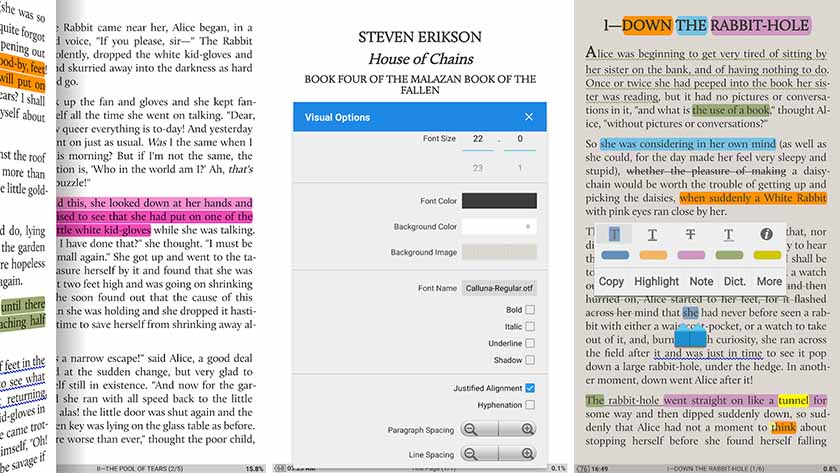
Moon Plus Reader is definitely one of the best e-book reader apps out there. It supports a wide range of e-book formats, including EPUB, PDF, MOBI, most comic book formats, and more. It even has OPDS support. The app also includes over ten themes, gesture controls, auto-scrolling, EPUB3 support, and cross-device syncing via Dropbox. It’s one of those e-reader apps that has all the right bells and whistles. You can remove ads for $8.99 by purchasing or upgrading to the pro version.
Libby, by OverDrive
Price: Free

OverDrive is an excellent e-book reader, and it’s not because it supports your current library. OverDrive connects you to your local library, and you can actually borrow e-books you don’t own for free, just like you can at your local library. It includes some neat features, like no late fees, and it’ll remember where you left off the next time you read. It doesn’t have a lot of the power-user features of other e-book readers. However, it is one of the truly great and legal sources of free e-books.
Ploter
Price: Free

Ploter is an up-and-coming ebook reader app. It’s a cloud library that contains your ebooks. It works similarly to YouTube Music or Apple Music. You upload your ebooks to the service and access them from the app wherever you are, as long as you have an Internet connection. It works with most ebook and audiobook formats. It also works cross-platform with Windows and Kobo-branded ebook readers.
You get 500MB of free storage, which the developer estimates is around 200 ebooks worth. They plan to add premium tiers with more storage later on, but it hasn’t launched yet as of the time of this writing. It’s new, so there are bugs, but we like the idea, and we hope the app does well in the future.
PocketBook Reader
Price: Free/ In-app purchases ($0.99 – $294.99 per item)
PocketBook is another one of the older e-book reader apps. Don’t let that fool you, though. This app has enough features to justify its existence here. That includes support for most common e-book file types, comic books, and even Adobe DRM and PDF. You can highlight text, export notes, lock your screen orientation, and more. There is also OPDS support for those who need it. The highlight of this one is its price. There aren’t a ton of completely free e-book readers these days, and this app is easily among the best in that category.
Prestigio Book Reader
Price: Free / In-app purchases ($0.99 – $99.99 per item)
Prestigio changes its name almost every year. However, it’s still one of the better e-book reader apps. The app supports over 25 languages, has text-to-speech functionality, and has 50,000 books available for download. Additionally, the app can sync across devices (account required). Some other features include a night mode, various customization options, and a decently modern UI. The app is free. You can pay to remove ads. There is also an optional donation button if you want to support development.
ReadEra
Price: Free

ReadEra is a surprisingly popular e-book reader app. It has all of the basics, including various reading modes and support for PDF, EPUB, Word, MOBI, FB2, DJVU, TXT, and the super rare CHM formats. It doesn’t require any services or anything like that. There is also a split-screen mode where you can read multiple books or documents at the same time. However, we really only recommend that on larger-screen phones or tablets. This one is surprisingly good and easy to use. The UI looks nice as well. We’re also relatively certain that this one is entirely free.
EBook Reader
Price: Free

Ebook Reader is another great app on our list. This one not only lets you read your locally stored PDF or EPUB files but also offers you the option to download books. For your convenience, they have user-created book collections so that you don’t have any trouble finding your favorite books. The app lets you read in landscape mode as well as portrait mode. It has easy navigation tools and a simple UI. The text size is adjustable, and there’s online synchronization for notes, highlights, and your current reading progress. It’s not anything fancy, but it’s good for a free reading app.
If we missed any of the best e-book reader apps for Android, tell us about them in the comments! You can also click here to check out our latest Android app and game lists!
Thank you for reading!
Thank you for being part of our community. Read our Comment Policy before posting.