Affiliate links on Android Authority may earn us a commission. Learn more.
Google’s Pixel VIPs redesign starts rolling out to users
Sep 18, 2026 — 11:10 AM ET



- Google is rolling out the Pixel VIPs redesign announced with the September Pixel Drop.
- The update adds faster VIP switching, reorganizes local updates, and refreshes the interface with Material 3 Expressive styling.
- Google has also removed the old “Things to do together” recommendations section.
Google came into the September Pixel Drop with a list of upgrades for Pixel VIPs, but there was one catch: It didn’t actually show us what most of them looked like. We did manage to get an early look at the redesigned home screen widget, but the rest of the experience was still largely hidden. That’s changing now with Pixel VIPs version 2.0.97, which is starting to roll out, and we’ve captured a full gallery and video showing the refreshed VIP page in action.
The biggest change becomes obvious as soon as you open a VIP from the widget. A new floating navigation strip sits at the bottom, letting you swipe between VIPs without backing out to the widget first. You can also jump straight to someone by tapping their profile picture in the strip. Long-press the bar and left and right arrows appear, giving you another way to move through the list.
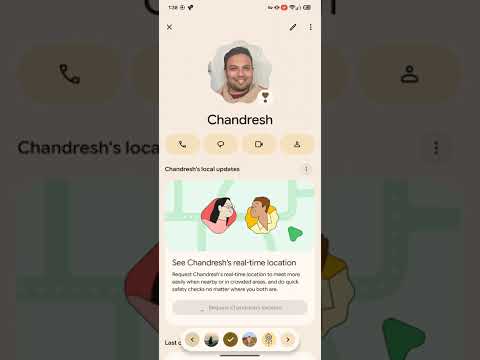
Google has also reorganized the VIP page itself. “Local updates,” including weather and time, now sits near the top instead of below “Last connection.” The weather and time cards also have a more pronounced background, making them easier to spot at a glance. When location information is available, it lives in this same upper section.
The rest of the redesign leans further into Material 3 Expressive. Profile photos now use a scalloped, flower-like frame instead of a simple circle, while the call, message, video, and contact glyphs switch from filled icons to outlines. A pencil button in the upper-right corner takes you directly to editing that VIP’s contact details.
One thing has disappeared, though. The old “Things to do together” section is no longer present in the updated interface. That area previously suggested nearby activities and popular movies and TV shows based on the categories you selected.
Google announced these Pixel VIP changes as part of the September Pixel Drop, and this rollout finally gives users the complete redesigned experience.
Conversation
Read what readers said or add your take.