Affiliate links on Android Authority may earn us a commission. Learn more.
I spent two hours with Googlebooks. Here are the 8 most important things to know
Sep 21, 2026 — 9:00 AM ET



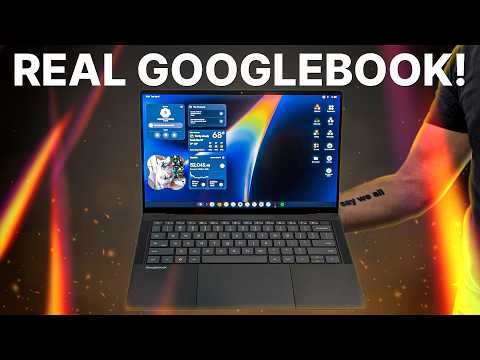
It’s not every day we see a brand-new kind of laptop launch, let alone one with a new OS from a brand that’s never thought of as a rival to MacBooks or premium Windows machines. But Google’s giving it a shot anyway with its Googlebook family.
This is both a new line of products and a fresh operating system, or, as Google would prefer you think of it, an “intelligence system,” in one. And the goals are noble ones — to offer a premium laptop that works with the devices of billions of Android users worldwide and delivers AI features in ways other PCs have yet to offer.
I got to spend a couple of hours trying out the five different Googlebook models that Google is starting out with. These all offer the same software features, which we’ll look at first, but later we’ll check out the different form factors you’ll be able to buy come the start of October. There’s a lot to go over, but rest assured that everything Google and its partners have to show off adds up to some exciting productivity-focused machines with plenty of smarts and a number of fun touches.
Which Googlebook would you get?
Launching soon, and competitively priced
Pre-orders for the Googlebook open today — September 21 — for those who are already convinced to put their money down for one. For the more cautious among us, you can wait to see these laptops in person from retail launch day, which comes on October 4 in the U.S., and October 5 in Canada, the U.K., Ireland, France, Germany, and Australia.
Prices vary across the five different models launching under the Googlebook banner, but the starting prices range from $899 at their lowest to $1,299 at their highest, putting the collection roughly on par with a MacBook Air or a Dell Plus.
That’s not a price at which you’d want to snap one up on impulse just to see how it might work for you, but it should at least put it on your shortlist when shopping for your next workhorse laptop. Hopefully we see cheaper options, as well as some more powerful ones, in the future to suit the widest possible audience.
A new but familiar operating system

GooglebookOS is a combination of ChromeOS and Android, and should be quickly familiar to anyone who’s spent time with either. The desktop, toolbar, quick settings, app drawer and so on all use Google’s Material 3 Expressive design language, making moving through the Googlebook feel like navigating an oversized Pixel phone in the best possible way.
The Android links are apparent immediately. When setting a Googlebook up for the first time, you can move in via your Android device to set up your accounts, passwords, payment info, and more with minimal effort. You can also connect multiple Google accounts to switch between, which will make anyone juggling work and personal Android phones happy.
Moving through the Googlebook feels like navigating an oversized Pixel phone in the best possible way.
Surprisingly, the Googlebook makes a token gesture towards iPhone connectivity. There’s a dedicated iOS pairing app that lets you access contacts/accounts, phone calls and messaging on your Googlebook, plus AirDrop/Quick Share support. It’s nowhere near as much as Android devices get, as I’ll go over next, but it’s enough for a Googlebook to still be practical for Apple phone users.
Phone and laptop in harmony

Once you’re up and running on a Googlebook, you can use Continue On to hand off apps between your phone and your Googlebook without passing files between devices. App Cast does a similar thing, except you use the app by accessing your phone via a window on the Googlebook, similar to macOS’ iPhone Mirroring or Phone Link on Windows.
This connection also applies to your files. The Googlebook’s Files app connects directly to your phone, letting you pass documents and images between the two, as well as your Google Drive. The files also receive AI-generated descriptions to help you parse what’s in each folder at a glance, with natural language search available to help you hunt for images and documents you know exist but forgot to give a distinct name.
Using all of these phone-based features requires your device to run Android 17 or later. If you’ve upgraded your phone recently and your manufacturer sends out updates in a timely manner, this shouldn’t be an issue for most people interested in these features.
AI — everywhere but not mandatory

AI is, of course, a major part of the Googlebook’s offering. The Magic Pointer — which activates Gemini with just a wiggle of your mouse — is always accessible, ready for you to prompt with text, images or screengrabs, or pick one of its suggested contextual actions depending on what’s on your screen. Fortunately, Google has foreseen the potential irritation this could cause and allows users to adjust the sensitivity of this gesture, or turn it off entirely. There’s also a keyboard shortcut if you prefer to use it too.
Magic Pointer has all of Gemini’s abilities to access your Google apps to make calendar appointments and the like. But Google promises that it’s only active when you specifically summon it — no passive surveillance here, it seems.

Gemini can be used for all kinds of things on the Googlebook, with classic applications like summarising text, generating and editing images all present. One more unique demo Google showed off involved Gemini examining an email to assess its likelihood of being a scam. It’s a potentially invaluable use case that I’d never considered for Gemini before — assuming it’s reliable in real-world use.
The Magic Pointer… is always accessible, ready for you to prompt with text, images or screengrabs
Leaving Gemini behind for a moment, there’s Quick Insert, which takes the familiar copy/paste clipboard up another notch. This menu gives speedy access to emojis, translation tools and Google’s Rambler voice typing tool as well as your cut and copied snippets, with just a tap of the dedicated keyboard key.
Just like Android 17, Googlebooks can use Create My Widget to bring data from your apps together in one spot with a prompt. Magic Cue suggestions from the most recent Pixel phones are also here to let you quickly execute common tasks with selected text or information.

For true AI nerds, Google Antigravity comes pre-installed on Googlebooks for you to work on your agentic AI projects. And when it’s time to test them, these laptops have a built-in secure sandbox environment so you can try out your creations safely.
In case you’re not already signed up, Googlebooks come with a free year of Google AI Pro included, giving you full access to Google’s Gemini tools. Even if you’re not interested in those particular features, this subscription comes with a generous 5TB of cloud storage to keep your files.
Apps and games galore

Laptop users require more than just what the manufacturer ships pre-loaded on the device. To expand your Googlebook’s capabilities, Google offers up the entire Play Store for you to peruse. To help direct you to the best apps for Googlebook, there are new curated collections that showcase which apps have been desktop-optimized.
Among these are Netflix, Disney Plus, and HBO Max, so you can get to binge-watching as soon as you’ve set up your Googlebook, as well as more practical ones like Photoshop or CapCut. A Googlebook purchase comes with a three-month free subscription to both editing suites, so you can easily try them out to see how they compare to the versions on your existing laptop.
To expand your Googlebook’s capabilities, Google offers up the entire Play Store for you to peruse.
Google isn’t aiming for this first batch of machines to be performance monsters, but it has used two methods to give the Googlebook some gaming chops. First, it relies on the Play Store’s considerable library of games, which are all designed to work perfectly well on much lower-powered hardware than the Googlebooks provide. Through its Level Up program, Google has ensured over half of the top 100 games on the Play Store have been optimized for keyboard and mouse, and will continue to work to bring more into the fold.

The other is through bundling a year’s membership to the GeForce Now game streaming service with every Googlebook purchase. It’s another canny but generous offer on top of the other free subscriptions you already get with a Googlebook purchase.
Five versions to choose from

There’s a lot to talk about with the Googlebook software, but what about the hardware containing all these features? Well, that varies across the different models, as each of the five manufacturers involved in this launch has managed to make its own mark on its laptop despite the unifying brief from Google.
Taking a quick glance across these machines, the HP and Dell XPS models both look smart, but the stand-outs to me are the ASUS, which is super-light at 2.2 pounds; the Lenovo, which with a 15-inch body is the largest of the bunch, and the Acer, which is both the cheapest model available and the sole 2-in-1, complete with 360-degree hinge and stylus support for its touchscreen.
Each of the five manufacturers involved in this launch has managed to make their own mark.
In its bid to offer the ultimate in productivity of the initial quintet of Googlebooks, Lenovo also has an AI Mouse you can add to your order. Its name may make you think of some hideous and unnecessary LLM-powered peripheral, but it’s simply an ergonomic mouse with a Gemini shortcut button on the top, under the scroll wheel.

No doubt we’ll find more differences between these machines once we get them in for proper testing, but this spread of options from the start should mean anyone enticed to purchase a Googlebook will find a suitable match.
Unifying hardware features

The signature all Googlebooks share is the Glowbar, which you’ll find on the lids of all five laptops (though not always in the same spot). It’s an attractive way to proclaim to the world what kind of laptop you’re using, but it also has practical functions. It can display the laptop’s battery level and charging status, ambient activity like an active microphone, or when Gemini is processing a request.
As is often the case with Google, the Glowbar apparently has a number of easter eggs to discover within the Googlebook’s software. One I got to see (although the Google staffer refused to show us how to access it) was a “disco mode” that syncs the lights to your speakers. More importantly, Google is opening up developer support so this LED strip can gain even more uses down the line.
The Glowbar is an attractive-looking way of proclaiming to the world what kind of laptop you’re using, but it has practical functions too.
The other telltale sign that a laptop is a Googlebook is its two unique keys on the keyboard. One is the “G” modifier key, which lives where you’d normally find the Windows or Option key and fulfills similar shortcut duties. The other is Quick Insert, which has moved in with the Caps Lock to give you rapid access to that particular feature. It’s a little odd to have Caps Lock relegated to a “Fn + key” command, but since you’re likely copy-and-pasting things a lot more often than you’re trying to activate your keyboard’s shouting mode anyway, Google’s probably picked the best possible spot on the keyboard to get a new roommate.

For I/O, it seems that at minimum you’re getting two USB-C ports, a headphone jack, and a webcam. Some offer more ports, such as Lenovo’s large 15-inch model, which adds an HDMI connector and a webcam capable of facial recognition unlocking. All Googlebooks are equipped with fingerprint unlocking for quick access, with all but one (the Acer) getting a haptic trackpad as well.
The display options consist of a mix of LCD and OLED touchscreens, with some offering up to 2.8K resolution, high refresh rates, and matte glass. Three of the five (Acer, ASUS and HP) are 14-inch models, with Lenovo’s 15-inch version and Dell’s 13-inch edition book-ending the line-up in terms of size.
The power within

Googlebooks will be available with Intel, Snapdragon X Elite or MediaTek chips, depending on the model you pick. At launch, there are no MediaTek options available, with the choice being between Intel Core Ultra 3 (Panther Lake) silicon driving the Lenovo, Acer and Asus models or the Snapdragon X Elite-powered Dell XPS and HP.
All five Googlebooks models come with 16GB of RAM and 256GB of storage, with options to go up to 32GB/512GB if you know you’ll need the extra room. As for battery life, Google claims any of these devices will manage 14 hours of video playback or 16 hours of web browsing.
Googlebooks will get automatic app and OS updates, just like Chromebooks. But where the Googlebook goes further is with its promise of up to 10 years of updates, with quarterly platform updates adding new features, just like Pixels. That’s a long theoretical lifespan for these brand new laptops, even longer than the seven years that Google promises for new Pixel phones.
The outlook — a gripping introduction

It’s early days, but Googlebooks are undoubtedly more than just souped-up Chromebooks. These new laptops promise unmatched Android connectivity and AI, but even if those things don’t excite you, they look like great general-purpose premium laptops that should work well with some of the most common apps in use right now.
I’m also pleasantly surprised by the price of these first Googlebooks. They’re competitive in an era when component costs are rising across the market. Part of this is due to Google and its hardware partners avoiding the highest-powered chipsets, big RAM packages, and dedicated GPUs that would add hundreds to the MSRP, but hopefully strong Android app support and streaming apps will bridge the performance gaps where needed.
Googlebooks are undoubtedly more than just souped-up Chromebooks.
For work and casual browsing/streaming, any of these Googlebooks should offer everything you need, plus a lot of smart features that should save time and hassle. And when you consider the free subscriptions to four different services, two of which you get for an entire year, the value scales tip even further in your favor, as long as these promotions are active.
I can’t wait to get some more time with a Googlebook. As someone whose work life takes place almost entirely in Chrome tabs, I am hopeful that I can see significant benefit in using Google software paired with Google-approved hardware from top to bottom, with sufficient power and efficiency to meet my needs. Microsoft and Apple may not need to worry about losing significant numbers of users just yet, but — like you — they should definitely be paying attention to what the Googlebook could be capable of.
Conversation
Read what readers said or add your take.