Affiliate links on Android Authority may earn us a commission. Learn more.
The latest Android Drop brings an unexpected crossover between Google Messages and Keep
Sep 1, 2026 — 2:00 PM ET



- Google has announced new features coming with the September Android Drop.
- With the update, threads in Google Messages can now include a collaborative checklist.
- This feature is powered by Google Keep, and all participants in a chat can edit the list or mark items as complete.
- Messages will also prompt users to generate a list through Suggested actions.
Like clockwork, Google’s next quarterly update for Android devices, the September Android Drop, is here. After triggering the flow of incoming features early with the Motion Assist and themes in Google Messages last week, Google is bringing new abilities to a host of apps. These new features include better collaboration between Gemini and Find Hub to find items more easily, and Guided Vision to help people with vision-related disabilities visualize the physical world around them. Along with these, Google Messages is getting a feature that will make planning events and trips more efficient.
With the latest Android Drop, Google is bringing Google Messages one step closer to becoming your notes app. While the previously documented (and unofficial) RCS trick lets anyone jot down notes in messages and send them to themselves, Google is importing official Keep features into Messages. The update brings an option to insert a live checklist into a Google Messages thread.
The feature lets anyone in a message thread, including groups, collaboratively mark items as done or edit the checklist. The checklist can be created within Google Messages without first going to Keep and shared with other participants, though data will be shared back with Keep. Currently, we can’t say whether a backup of the list will also be saved in Keep, but there’s certainly a benefit in terms of later discoverability.
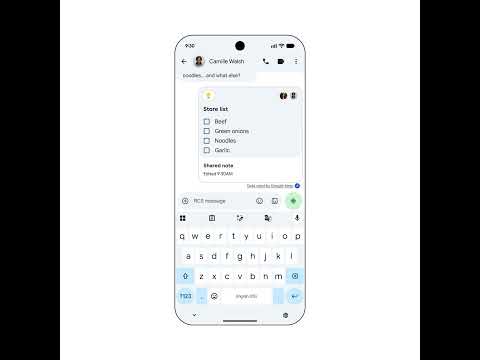
To create a checklist in Messages, you can tap the (+) icon on the left of the message input box. Google’s demo also shows that an option to “Create List” appears as a suggested action when someone else mentions a collection of items that can clearly use being sorted into a list.
The feature starts rolling out to most recent Android devices with the latest September features update today.
Thank you for being part of our community. Read our Comment Policy before posting.