Affiliate links on Android Authority may earn us a commission. Learn more.
Google Messages now lets you give every chat its own look
Aug 27, 2026 — 2:03 PM ET
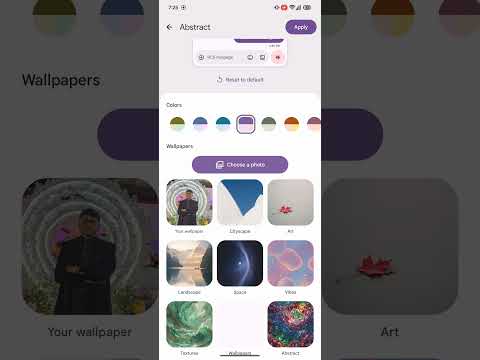


- Google Messages is rolling out custom chat themes and wallpapers after months of testing.
- You can use preset backgrounds or your own photos, with matching message bubble colors.
- Themes are private to you, and RCS must be enabled to use them.
We first spotted Google working on custom chat themes for Messages back in May — a feature that users of some other messaging apps have had for a while. Google is finally catching up on that front today, announcing that users can personalize individual conversations with custom colors and wallpapers.
Which iMessage feature do you want on Google Messages most?
In a Messages Community post, Google explained that users can now change both message bubble colors and chat backgrounds. You can choose one of Google’s preset wallpapers, pick an image from your own gallery, or stick with a simpler color theme.
The preset wallpapers are organized into categories such as Animals, Landscapes, and Space. If you choose a new background color or one of those preset wallpapers, Messages can automatically adjust the bubble colors to match, though you can still change the color palette manually if Google’s choice doesn’t work for you.
To change a chat theme, open a conversation and tap the recipient or group name at the top, or use the three-dot menu, then select Chat theme. From there, you can pick a color preset, choose a wallpaper category, or upload a photo from your gallery. Google also gives you a preview before you apply it, and there’s a Reset to default option if you later regret turning the family group chat into a shrine to your dog.
Themes are set per conversation and are only visible to you, so changing the wallpaper behind a group chat won’t redecorate everyone else’s Messages app. RCS must also be enabled for the feature to work.
The setup will look familiar if you use WhatsApp, which rolled out its own chat themes last year. Google’s version follows much the same idea, giving Messages users more control over how each conversation looks without changing anything for the people on the other end.
Thank you for being part of our community. Read our Comment Policy before posting.