Affiliate links on Android Authority may earn us a commission. Learn more.
After a few days with the Fitbit Edge, I think Google found the sweet spot
Oct 20, 2026 — 5:00 AM ET



2026 has proven to be a really strong year for Google wearables. The $100 Fitbit Air is an excellent entry point into Google Health and a solid all-around fitness tracker for someone who doesn’t want the distractions and bulk of a smartwatch. For folks who do want a smartwatch, the Pixel Watch 5 is one of the best you can buy. But with a $399 starting price, it’s a lot more expensive, too.
That’s what makes the new Fitbit Edge so compelling. At $180, it’s substantially cheaper than the Pixel Watch while still offering an interactive AMOLED display — something the Air lacks. But with fewer onboard apps, no speaker or microphone, and a really compact/lightweight design, it’s more approachable for people who don’t want the smartwatch life, but still want to check the time or see workout data on their wrist.
It’s a promising middle ground on paper, and after a few days wearing the Fitbit Edge myself, I think Google might have found its sweet spot.
Fitbit Edge vs. Fitbit Air vs. Pixel Watch 5: Which would you buy?
Promising hardware (and much smaller than expected)

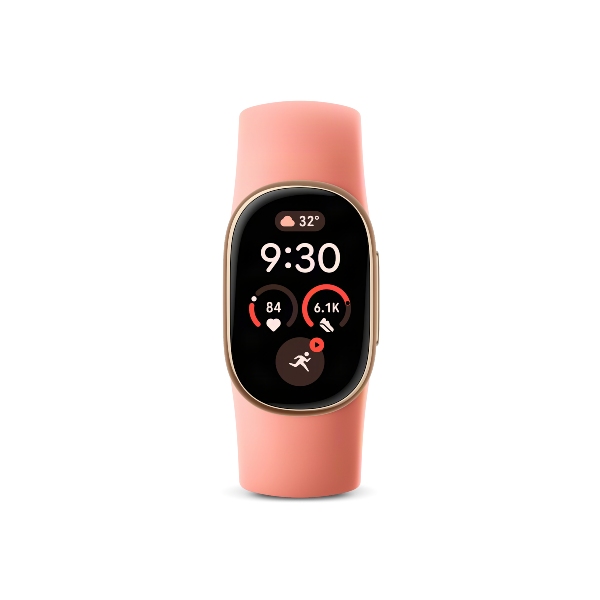
I didn’t expect the Fitbit Edge to be a large wearable, but I was surprised by just how compact it is after unboxing it. As you can see in the photo above, the Edge isn’t that much larger than the Fitbit Air, and it’s significantly smaller than the Amazfit Balance Ultra I was wearing previously.
The Edge feels like practically nothing when you hold it, and on my wrist, it’s one of those wearables that’s easy to forget I have on (in a good way). The 100% recycled aluminum case looks great, the large physical button on the side feels nice, and watch bands pop in and out with ease. Yes, this is yet another proprietary watch band system, but it at least seems reliable.

Of course, the real star of the show for the Edge’s hardware is its display. This is a 1.3-inch AMOLED panel, and my first impressions of it are encouraging. It’s easy to read, has pleasing colors, and the touch responsiveness seems good, too.
Just the fact that there is a display on the Fitbit Edge, a tracker not much bigger than the Fitbit Air, is the real reason to buy it over the Air. I don’t need my wearable to have every app under the sun or to have AI baked in, but I do want to be able to look at it to see the time. I want to look at it to read notifications from my phone, start and stop workouts, see my heart rate and pace while running, and control media playback. The Edge’s display lets you do all of that, and while the actual health-tracking capabilities may be very similar to the Air’s, the screen adds so much more on top of them.
A custom OS that’s off to a good start

As for the software you interact with through the display, it’s a custom operating system that’s much lighter than Wear OS, though it shares some similarities. From the clock face, you swipe down to see your quick settings, swipe up to view any notifications, and swipe left/right to see your customizable tiles — including ones to start a workout, show your health and sleep data, check the weather, and more.
The whole interface feels quite snappy and responsive, and while I’ll have to see if that holds up after prolonged testing, it’s certainly off to a good start. There are no third-party apps or watch faces to download (Google gives you 12 customizable faces out of the box), and while that may be a bummer for some people, I suspect that’s part of what helps keep this OS so nimble.
And despite its simplicity, there are some surprisingly nice touches throughout the software. While the Fitbit Edge doesn’t run Wear OS, many of its tiles, apps, and watch faces resemble design elements from Material Expressive. I also think the Google Maps app is a nice touch, mirroring turn-by-turn directions from your phone on your wrist.
The Fitbit Edge is very much not a smartwatch, and it’s not trying to be. But for the software and experiences that are present, I like what I see so far.
The new sweet spot for Google wearables?

The Fitbit Edge is a product that just makes so much sense to me. The Pixel Watch 5 and Fitbit Air are both fantastic products, but they also operate at opposite ends of the spectrum. The Pixel Watch provides a robust and powerful smartwatch experience at the expense of battery life and your wallet, while the Air offers significantly longer battery life at a much lower price, but without a display.
Slotting the Fitbit Edge right in the middle is a genius move and, selfishly, one I was personally hoping for. I’ve been eager to give Google Health another shot, but I don’t want a wearable I have to charge every other day. And as comfortable as the Fitbit Air is, I really prefer having a display.
If the Fitbit Edge lives up to everything it promises, it could be the wearable I keep on my wrist for the foreseeable future. But there’s a lot more testing to do before I make that call, and that’s what I’ll focus on after I publish this hands-on piece.
The Fitbit Edge is available for pre-order now for $180 and officially launches on October 27.
Thank you for being part of our community. Read our Comment Policy before posting.