Affiliate links on Android Authority may earn us a commission. Learn more.
Gemini’s new Canva integration turns AI creations into fully editable designs
May 19, 2026 — 3:59 PM ET



- Google has expanded Gemini’s connected app ecosystem with Canva integration.
- Designs created in the Gemini chat are now fully editable inside the Canva Editor.
- Magic Layers can now turn an AI-generated image into a fully editable design asset.
From the launch of Gemini 3.5 Flash to the announcement of “Universal Cart,” it’s been a busy day of announcements for the start of Google I/O 2026. Not to be missed, Google also announced that it is expanding Gemini’s connected app ecosystem through new integrations. One of the new integrations includes the design platform Canva.
Don’t want to miss the best from Android Authority?
- Set us as a favorite source in Google Discover to never miss our latest exclusive reports, expert analysis, and much more.
- You can also set us as a preferred source in Google Search by clicking the button below.


Starting today, you’ll be able to connect to Canva directly in your chats with Gemini. After creating an image in Gemini with Google’s Nano Banana, you’ll be able to use Canva’s Magic Layers to turn that previously uneditable image into a fully editable design asset. You can then go right to the Canva Editor to refine and resize elements before publishing.
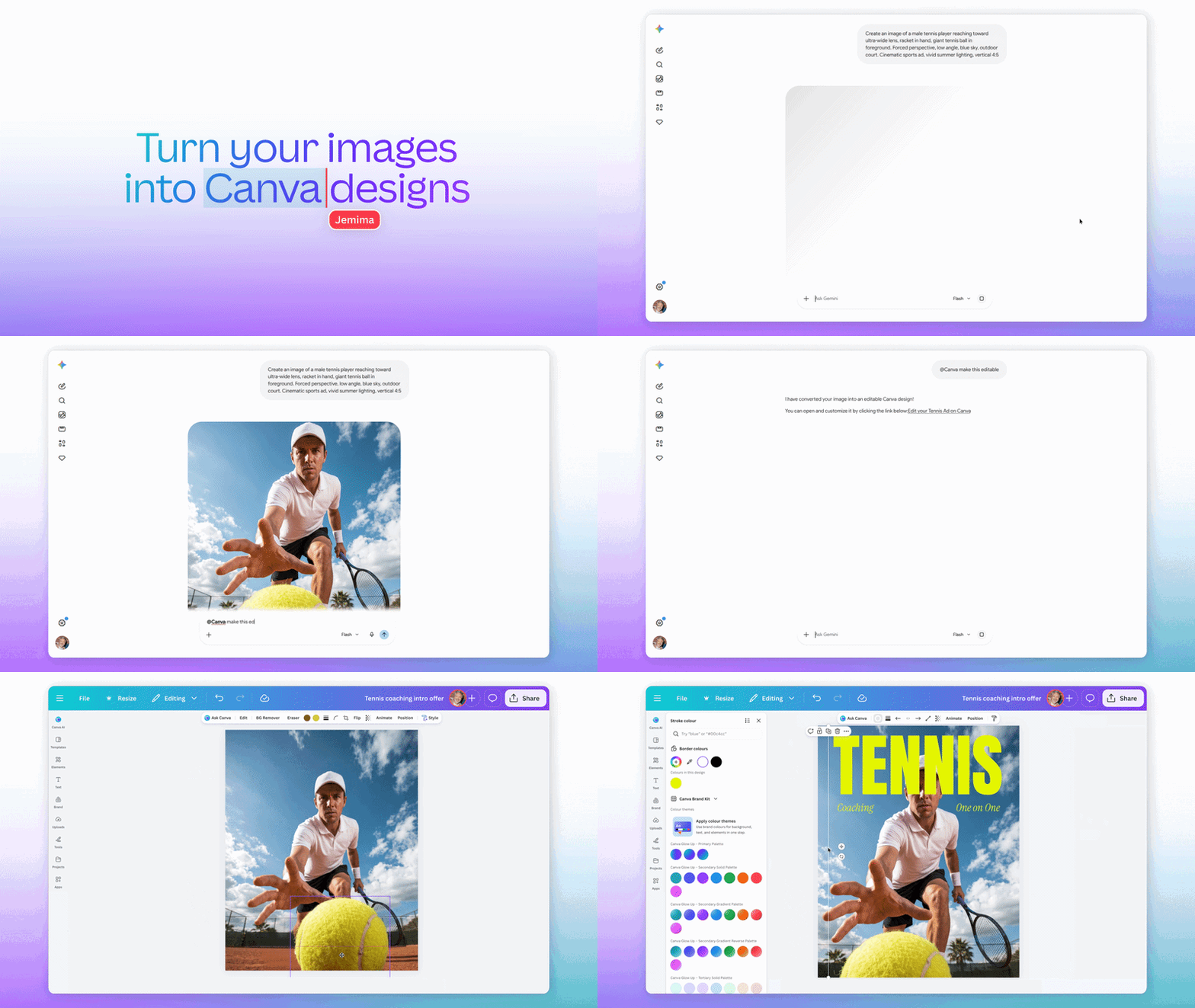
For example, say you want to make a poster of a tennis player reaching out for a ball in the foreground. You could have Gemini generate that image for you. Then by typing “@Canva make this image editable” into the text box, Gemini will connect to Canva and present you with a link that will take you to the Canva Editor so you can make the changes you want.
Whatever images you generate in the Gemini app will be connected to your Canva Brand Kit. That means you’ll have access to your desired fonts, colors, and visual style to maintain brand consistency. This will also allow you to collaborate on your edits with others.
The Canva Connected App for Gemini is rolling out today with limited availability. However, full availability is expected to come soon. You’ll need to enable Canva in the Gemini app settings to get started.
Thank you for being part of our community. Read our Comment Policy before posting.