Affiliate links on Android Authority may earn us a commission. Learn more.

The ASUS ROG Xbox Ally X20 is the best (and priciest) Ally yet
Oct 26, 2026 — 7:45 AM ET
ASUS ROG Xbox Ally X20
MSRP: $1,299.99
What we like
What we don't like
ASUS ROG Xbox Ally X20


Last year, ASUS and Microsoft teamed up to release the ROG Xbox Ally and ROG Xbox Ally X. The handheld gaming PCs were Microsoft’s first real push into the space, debuting a new full-screen Xbox interface to help bridge the gap between PC and console-style gaming experiences. The higher-end Xbox Ally X was particularly well received, with multiple outlets crowning it the best Windows-powered gaming handheld of the year.
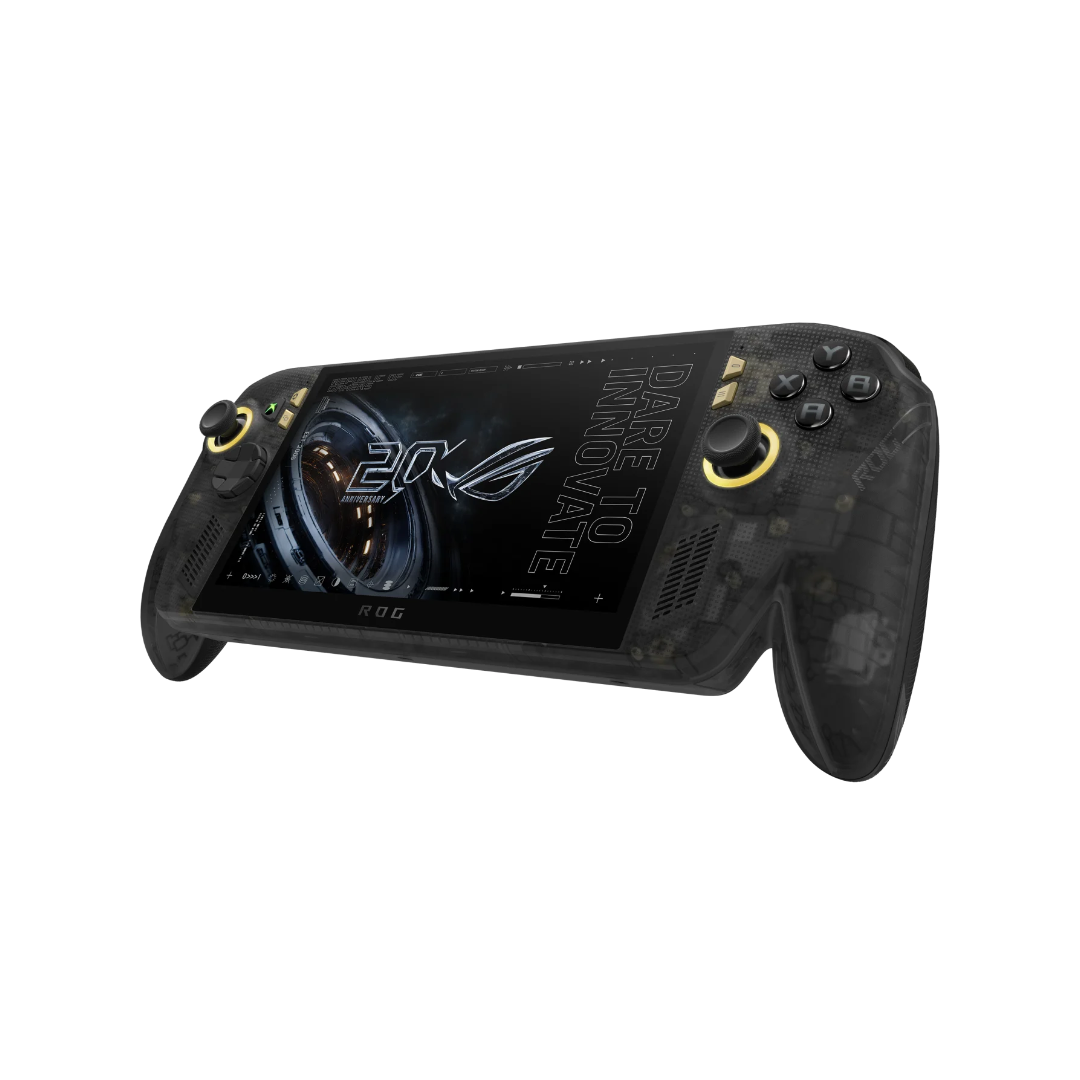
Now, Xbox and ASUS are back with an even higher-end Xbox Ally handheld: the ASUS ROG Xbox Ally X20. The X20 features the same AMD Ryzen AI Z2 Extreme processor and 24 GB of LPDDR5X memory as last year’s Xbox Ally X, along with a great new OLED display, a sleek transparent plastic shell, updated controls, and more. After gaming on the thing for a couple of weeks, I’m really impressed — but Windows is an iffy handheld OS, and the X20’s $1,300 price tag may be a tough sell for everyone but the perfect target audience.
Game performance is (mostly) great

Starting with what matters, the ASUS ROG Xbox Ally X20 is one of the more powerful gaming handhelds on the market today, and performance out of most games is really impressive for a device that comfortably fits in a backpack. It comes with the same AMD chip and 24GB of RAM as last year’s Xbox Ally X handheld, so there isn’t any extra horsepower here. But the Ally X was already widely regarded as one of the best Windows handhelds you could buy, and the same capability with some added bells and whistles isn’t bad by any means.
Performance has been strong across a variety of games I’ve tried out. The ASUS ROG Xbox Ally X20 has a handful of performance presets, the most powerful being a 35-watt Turbo setting only accessible when the unit is plugged into a power source (unplugged, Turbo mode is capped at 25W). Connected to a power source, the X20 ran every compatible game I tried well enough that I usually wasn’t thinking about performance at all.

On that plugged-in Turbo setting, Resident Evil 4 (the 2023 remake, that is) was able to maintain a fairly consistent 30 frames per second at 1080p with graphics settings turned to high. With the same in-game settings, frame rate regularly dips into the 20s on the 17-watt Performance preset the handheld defaults to when on battery power. Dialing the resolution back to 720p and lowering some graphics settings saw the game back at a steady 30fps.
The visually busy Warhammer 40,000: Space Marine II ran well enough for me at medium graphics settings. On the X20’s 35W Turbo setting, the frame rate typically hovers in mid-30s, but that’s about the best the X20 can do here — cranking settings to high on Turbo knocks performance down to the 20s in large, open levels.
Forza Horizon 5 performed very well with graphics settings maxed, even on the Performance preset. Frame rates bottomed out around 50fps in nighttime races with complex lighting, and hovered at or around 60 during daytime sequences. (The latest Forza Horizon 6 is, unfortunately, not available through the Game Pass trial the X20 includes).

Plugged in on Turbo, The Elder Scrolls IV: Oblivion Remastered maintained a fairly steady 40 frames per second on low graphics presets. Unplugged, in Performance mode with low in-game graphics settings, I saw about 30 frames in outdoor spaces. It’s playable, to be sure, but given the remaster is built on top of a 20-year-old game, I expected better here. I imagine this is more to do with Bethesda’s optimization than it is anything specific to the ROG Xbox Ally X20, however.
Specific games may have compatibility issues. I fired up The Witcher 3: Wild Hunt Remastered, for example, and performance was generally good. But because of compatibility problems with AMD drivers, some foliage renders incorrectly, showing up pitch black in-game, and parts of some character models don’t render at all. This isn’t the X20’s fault, though, and I imagine it’ll get ironed out soon enough. Still, if there are any specific games you’re really itching to play on this thing, make sure to double-check there aren’t any oddball issues that might get in the way before you dive in.
Naturally, simpler games like Hollow Knight: Silksong and Ori and the Blind Forest are a breeze for the Ally X20 — but if that’s the type of game you’re looking to play on the go, you won’t need a $1,300 handheld PC to do it — grab an Android handheld and save yourself some cash.
Battery life from the ROG Ally X20’s 80Wh cell is variable depending on what you’re playing, of course, but I typically saw about three hours of battery life while playing graphically intensive games on the Performance preset. For less graphically intensive titles, battery life can stretch to four hours or longer.
The Ally X20’s backside can get a bit toasty during longer sessions, and at higher loads, its cooling fans can get quite loud. But the fans do what they’re meant to: the X20 I’ve been testing hasn’t ever felt too warm to hold comfortably, and I haven’t noticed any performance throttling when it does heat up.
This hardware is very nice

Despite being built like a brick at over an inch thick and nearly two pounds, thanks to its Xbox-style controller handles, I’ve found the X20 remarkably comfortable to hold, even for longer stretches of time. Though it weighs half a pound more than my Switch 2 (with controllers attached), the X20 is considerably more comfortable to use for extended periods, owing to its much better ergonomics. Its larger grips make it a little less portable, but if the same game is available on both platforms, I’d rather spend an afternoon holding the X20 than the latest Switch.
Inputs feel great. The face buttons and bumpers offer a satisfying click when pressed, and the hall-effect analog triggers provide comfortable resistance throughout their range of motion. In an upgrade versus the previous ROG Xbox Ally X, you’re able to rotate the ROG Xbox Ally X20’s directional pad to toggle between four-way and eight-way input (four feels better to me, generally). Another big get for controller enthusiasts: the ROG Xbox Ally X20 has TMR (tunneling magnetoresistance) joysticks, which should be more precise than even hall-effect sticks. I won’t pretend I can tell the difference by feel, but given the price point of this handheld, it’s good to know ASUS paid attention to the details.

There are two customizable macro buttons around back, where I can easily reach them with my index or middle fingers. I don’t typically bother with customizable extra keys on controllers that have them, and I don’t get much use out of them here, either. Still, it’s a nice-to-have for anybody who wants or needs more control flexibility. Haptics are also very good, with vibration that can be subtle or strong without getting loud or feeling buzzy.
The upgraded OLED display is great, too. Where last year’s ROG Xbox Ally X came with a 7″ LCD panel, the X20’s rocking a 7.4-inch OLED. It matches the older model’s 1080p resolution and 120Hz refresh rate (with VRR support), along with higher peak brightness and Dolby Vision-blessed HDR. Games look great on this display, with OLED’s characteristic true blacks and punchy colors. It was sometimes hard for me to make out details in darker scenes when playing in bright settings, even despite the display’s 1,400-nit peak brightness (see below), but this wasn’t typically a problem.

The X20’s got the same stereo speakers as the Ally X, as well, and they sound loud and full. At higher volumes, you can feel the unit vibrate softly as it pumps out bassy tones. If you need better audio or more privacy, you can connect headphones either via Bluetooth or through the 3.5-millimeter jack at the top of the handheld.
In addition to the audio jack, there are two USB-C ports up top, either of which can be used for charging or data, as well as a microSD card slot that supports cards up to a terabyte. With the ROG Xbox Ally X20’s terabyte of internal storage, though, there’s space for multiple large game installs.
Software is a mixed bag

The ASUS ROG Xbox Ally X20 runs Windows 11 under the hood, and it ships with the Xbox Full Screen Experience enabled. The launcher mimics the look and feel of Microsoft’s Xbox consoles, making it more seamless to interact with the X20 using its built-in controls. It also bypasses some of the processes the full Windows experience typically runs that aren’t necessary to boot games, which evidently boosts game performance. This feature was exclusive to ASUS’s Xbox-branded handhelds when they debuted last year, but it’s now available on Windows game handhelds from other manufacturers, as well.
This Xbox-style experience is typically solid, offering easy access to games in a controller-friendly way. Many players who have purchased popular games on Xbox consoles (myself included) are able to play those same games on the ROG Xbox Ally X20 without purchasing them again, thanks to the Microsoft’s catalog of 1,000-plus Play Anywhere games. This is a Windows feature that’s not exclusive to the Ally X20, but it’s very handy here nonetheless.
Windows 11 just isn't a very good experience with a gamepad or touchscreen.
Play Anywhere includes a handful of games I’d previously purchased on my Series X, like Warhammer 40,000: Space Marine II and Kingdom Come Deliverance II. Not every game you’ve bought on an Xbox console will be here — for my own library, Elden Ring and Star Wars Zero Company are big omissions from Play Anywhere — but the catalog includes plenty of heavy-hitters. Supported games include cross-save between Xbox consoles and PC, so you can easily jump back and forth between devices if you’ve got more than one. But again, that’s a Windows gaming feature and not an exclusive ASUS ROG Xbox Ally X20 feature.
Depending on what you want to do with the ASUS ROG Xbox Ally X20, you’ll likely have to interact with the standard Windows interface from time to time, which just isn’t a very good experience with a gamepad or touchscreen. The OS isn’t tailored to such a small display — it even recommends connecting a mouse and keyboard the first time you open up the Windows desktop. On the other hand, those peripherals, along with an external monitor, would enable using the ASUS ROG Xbox Ally X20 as a full-featured and capable desktop PC, if you’re into that. So far, though, I haven’t been able to test the handheld outside of gaming contexts, which has meant I’ve (thankfully) rarely had to dig into the full Windows experience.

Given it’s a Windows PC, you can download and play tons of games on the ASUS ROG Xbox Ally X20 through Game Pass. The handheld comes with two months of Game Pass Premium, which normally costs $15 per month. The $30 value hardly offsets the X20’s price tag, but complimentary access to such a wide selection has been nice for putting the handheld through its paces during my testing period. If I’ve got one complaint here, it’s that the X20 really ought to come with a trial of the highest-end $23/month Game Pass Ultimate, which includes an even larger catalog of games, like the latest Forza Horizon 6 and Gears of War: E-Day.
You won't often have to venture outside the Xbox-flavored UI.
You’ve got access to alternative PC game storefronts on the X20, too, like Steam (which comes preinstalled), Epic Games, and GOG. You’re able to shop for and launch games directly from these platforms, but once downloaded, games obtained from those stores will show up in the Xbox Full Screen Experience launcher right alongside your Xbox PC games, so you won’t often have to venture outside the Xbox-flavored UI. That’s pretty slick.
I have experienced a handful of odd and annoying software bugs, like the ASUS ROG Xbox Ally X20’s volume rocker going unresponsive, button inputs not registering on the Xbox home screen, and some weird behavior when returning to a suspended game after the handheld has been in sleep mode — Resident Evil 2, for example, opened to the pause menu but wouldn’t let me resume playing until I force-quit the game then booted it back up. These issues have seemed fewer and farther between the longer I’ve used the X20, but the software here just doesn’t offer the level of polish I think $1,300 should buy.
ASUS ROG Xbox Ally X20 review verdict: Should you buy it?

If you’ve got the cash, the ASUS ROG Xbox Ally X20 is a killer gaming handheld. Its AMD Ryzen AI Z2 Extreme processor and 24GB of RAM deliver good performance even in high-end modern PC games, and they look great on the X20’s new OLED screen. Its Xbox-style launcher spares you the worst parts of trying to live with Windows on a handheld, rounding up all your games from across storefronts into a single, controller-friendly UI, and Xbox’s deep catalog of Play Anywhere games will be a big draw for anyone already invested in digital Xbox games.
At $1,300, there’s no getting around the fact that the Ally X20 is expensive. If you can live without the OLED display, exclusive styling, and other bonuses like TMR joysticks, the 2025 ASUS ROG Xbox Ally X matches the X20’s performance at an MSRP that’s $300 lower. The base-model ASUS ROG Xbox Ally, meanwhile, isn’t nearly as powerful, but comes with a very similar form factor to the pricier models for $600. If you’re not big on AAA gaming, the lower-end version could be up your alley.

There’s always the Steam Deck OLED ($549 at Manufacturer site) to consider, too. Even starting at an inflated $789, the Deck is considerably less expensive than the Ally X20, and it’ll play many less demanding games just as well. There are naturally compromises compared to the X20: the Steam Deck is older, less powerful, has a lower-resolution display that tops out at 90Hz, and runs SteamOS. That last point will be a perk for some, but considering the Ally X20 can run Steam games, too, there are more games available on the ASUS handheld, and the Ally’s extra horsepower means higher-end titles will perform better here. (Not for nothing, though: you can get a Steam Deck and a Switch 2 for less than the price of the ROG Xbox Ally X20.)
If money is no object and you want an even better handheld gaming experience, there are more capable options. For example: the MSI Claw 8 EX AI+. At $1,799, the MSI Windows handheld brings all the same perks (and pitfalls) of a Windows-based handheld, features a newer, more powerful Intel Arc G3 Extreme processor, 32 GB of RAM, and a 120Hz, 1,200p display (though it’s LCD, not OLED).
Then there’s the Lenovo Legion Go 2. Lenovo’s heavyweight handheld Windows PC comes with the same Ryzen chipset as the X20, but also more RAM at 32GB, and a larger 8.8-inch OLED display with a higher 1,200p resolution and faster 144Hz refresh rate. It’s got Switch-style detachable controllers, too. But those extra features will cost you: the Legion Go 2 goes for a staggering $1,999 MSRP.
The ASUS ROG Xbox Ally X20 is a very capable machine that's expensive, but competitively priced against other Windows handhelds.
As it’s positioned in the current handheld space, the ASUS ROG Xbox Ally X20 is an appealing pick. It’s powerful enough to run nearly every game I’ve tried at acceptable (and sometimes very impressive) fidelity, and being a Windows PC at heart, it’s got access to an extremely wide variety of titles through multiple storefronts. It’s very comfortable to hold, its controls feel fantastic, and its display and speakers are top-notch.
It’s definitely a PC with an Xbox coat of paint — console gamers might be put off by the handheld’s various performance profiles, juggling of in-game settings depending on which profile is active, and occasional awkward touchscreen interactions with the standard Windows desktop environment. And the ROG Xbox Ally X20’s upgrades versus the 2025 ROG Xbox Ally X might not be worth the $300 price difference for some shoppers.
Still, if you know what you’re getting into and your wallet can handle it, the ASUS ROG Xbox Ally X20 is a very capable machine that’s actually pretty competitively priced compared to the other high-end handheld gaming PCs available today. I’ve really enjoyed gaming on the X20, and I think you will too.
- Strong game performance
- Lovely OLED display
- Great ergonomics
- Excellent speakers and haptics
- Extensive game compatibility
- Windows 11 can be annoying
- Performance isn't any better than ROG Xbox Ally X
- It costs $1,300
Conversation
Read what readers said or add your take.