Affiliate links on Android Authority may earn us a commission. Learn more.

The Apple Watch Series 12 is still superb, but Google has caught up
Nov 6, 2026 — 5:45 AM ET
Apple Watch Series 12
MSRP: $399.00
What we like
What we don't like
Apple Watch Series 12


What is it about the Apple Watch? I have worn and used dozens of smartwatches and fitness trackers over the last few years, and yet, if I want to use a smartwatch between reviewing them, it’s the Apple Watch I reach for.
Over the last month I’ve worn the Apple Watch Series 12, the latest model in the range, to try and once-and-for-all understand its allure. I think I know, but I also know it doesn’t necessarily make the Series 12 a must-buy for everyone, and the question over whether it could prompt a switch to Apple’s ecosystem is an even harder one to answer this year.
Because this is Android Authority, just a note before we begin. The Apple Watch Series 12 only connects to an Apple iPhone, so if you own an Android phone, you’ll need to look elsewhere. If you’re considering switching to an iPhone, the Apple Watch is the only smartwatch that fully interacts with iOS.
A design icon, ready to be personalized

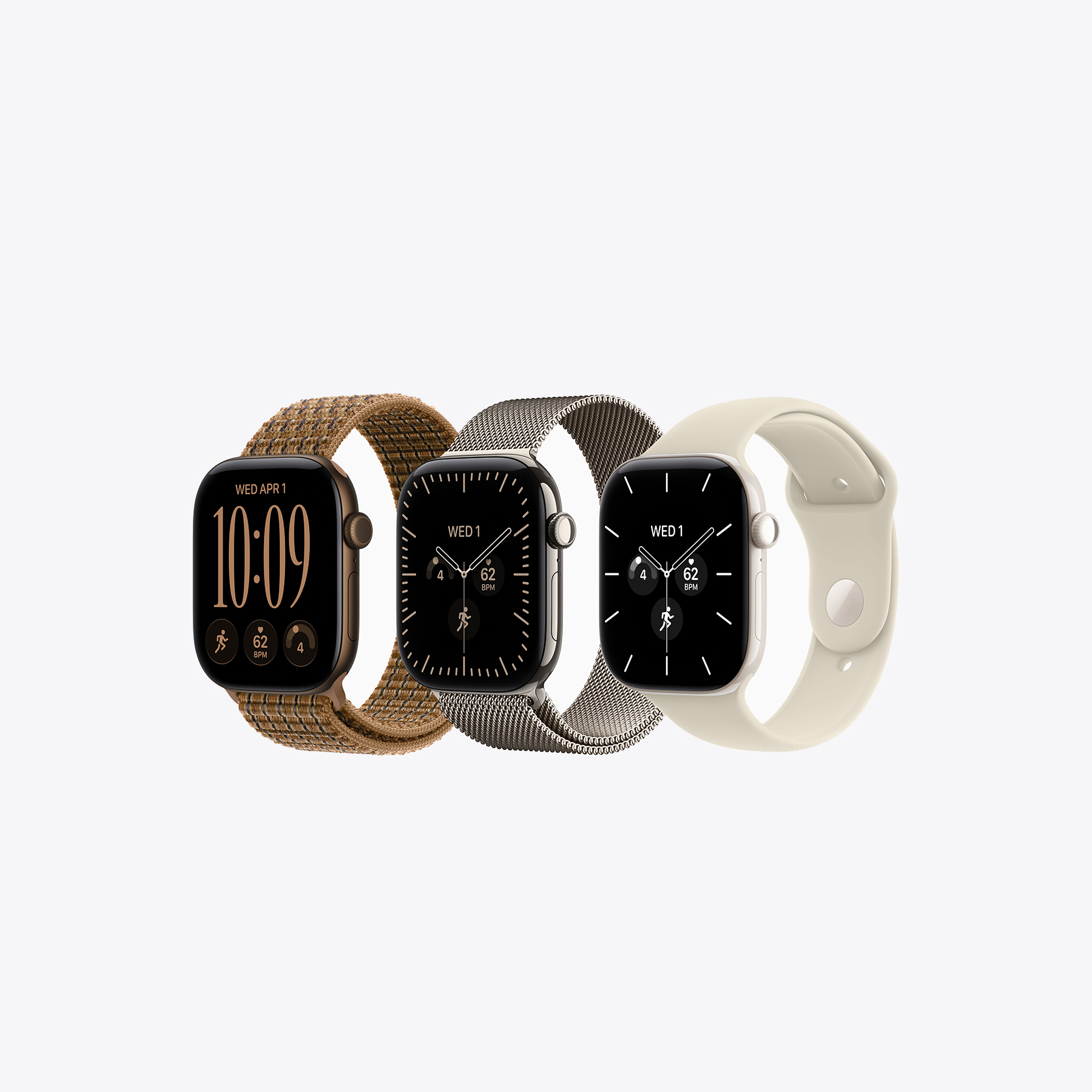
If you’ve seen or worn an Apple Watch Series 10 or Series 11, then the Series 12 will be very familiar, as the dimensions and weight are essentially unchanged. The square-ish case design used since the very first Apple Watch remains too, and while some see this as a negative, it’s actually one of the Apple Watch’s greatest strengths. I’ve reviewed the 46mm aluminum Series 12, which starts at $449, and a smaller 42mm case size is available from $399, if you prefer.
The proprietary band attachment system is unchanged, and it means the bands purchased for previous models all fit the latest one too. The consistency in the shape of the screen means watch face design has evolved with the technical advancements. The Digital Crown is in the same place on the side of the smartwatch, its functionality is largely the same, and even watchOS’s menu isn’t dramatically different from older versions of the Apple Watch.
Apple hasn’t needed to change anything because it all works so well, and anyone can change to the latest model and never have to relearn how to use it. The shape is spot-on, from the curve of the underside and case to the huge catalog of official and third-party bands, which makes it incredibly comfortable to wear. It’s as watch-like as you want, for example if you pair it with the soft and stylish Milanese Loop band, or more like an upscale fitness tracker when you attach the highly adjustable Sport Loop band. This versatility adds to its already impressive everyday livability, and the continued familiarity is a massive selling point.

It weighs 48g with the Sport Loop band and is just 9.7mm thick. I’ve happily worn it under shirt sleeves and overnight to track sleep. The watch face collection is varied and interesting, with a wide choice of data-heavy, stylish, traditional, or cute choices. Unlike on Samsung’s and Google’s smartwatches, I have a core set of watch faces I love on the Apple Watch and appreciate the effort that has gone into the primary design and the ambient looks too. I never look down at the Apple Watch and feel disappointed.
The Apple Watch is a smartwatch icon, and for good reason. It takes inspiration from mechanical watches in its wearability, band options, and face designs, but never loses sight of being a smartwatch. It has its own unique shape, which Apple has rightly stuck with, so it has become as recognizable as true classics like the Casio F-91W and the Audemars Piguet Royal Oak.
The Apple Watch is one of the few smartwatches I can wear all the time, day and night, without thinking about it
Design and wearability are two of the primary reasons I return to the Apple Watch so often, but that doesn’t mean Apple hasn’t played it extremely safe here. The new matte case back is very cool, but no one will ever see it. The Ceramic model looks beautiful, but it’s very expensive. There’s nothing to separate the Series 12 from the previous models, and certainly no hardware-based reason to upgrade.

I’m also not convinced switching from the Ion-X glass on the Series 11 to Corning’s Ceramic Shield 2 glass was an upgrade. Sapphire crystal is available on the titanium and ceramic case versions, but should be standard across the range. Ceramic Shield 2 is softer-feeling and warmer, with a less pleasing tactility to it than sapphire, although it could prove more durable than Ion-X glass.
The aluminum case comes in a choice of finishes, has 50 meters of water resistance, and has an IP6X dust resistance rating. The Apple Watch is one of the few smartwatches I can wear all the time, day and night, without thinking about it. It has long been the smartwatch’s greatest strength.
Feature creep threatens to spoil the superb software

The Apple Watch Series 12 runs watchOS 27 and uses the latest Apple S11 processor complete with Siri AI. Ask me if I’ve seen any performance upgrades over the S10 chip in the Series 11, and I’ll say no, with the caveat that it’s always highly responsive, and I’ve not experienced any irritating slowdown, even using intensive apps like Apple Maps. I’m sure that deep inside the Series 12, the S11 is doing a better job than the S10, but I haven’t noticed. Equally, I haven’t noticed problems either.
WatchOS itself has become more dense, more complex, and unfortunately, messier over the last few years. Some of the changes feel like change for change’s sake. For example, a press of the Digital Crown now opens a sparse ‘favorites’ view of apps you’ve used recently, and a twist of the Digital Crown shows the familiar app tile view. It’s not bad; it’s just unnecessary.
Live Activities and the Smart Stack can be similarly frustrating. This feature shows activities and suggestions from apps as widgets on the main screen, and while it’s sometimes helpful — such as seeing how long remains on a parking ticket — it also makes it quite hard to see the time at a glance, because it’s squeezed into the top corner of the screen. I dislike how easy it is to pause music or videos playing in Live Activities too, but at least you can turn the feature off.

Special mention here should go to watchOS 27’s expanded gestures, where you tap your fingers together or flick your wrist to move through text and the Smart Stack, and to dismiss notifications. It never fails, responds instantly, and is even more helpful than ever. This level of refinement makes watchOS, and the Apple Watch in general, special.
Notifications are also one of the Apple Watch’s successes. Arriving instantly, and accompanied by a noticeable and highly tactile vibration, notifications from compatible apps are rich and interactive, but don’t expect this from all apps. Some are simply messages, and you have to open the app on your iPhone to do anything. There’s plenty of customization too, so you can have as many or as few interruptions as you like. I was quite happy to turn off the daily mindfulness reminders, for example.
Siri AI may prove to be useful one day, and maybe I expected too much, but this was a particularly bad experience
What worries me a little about these changes is the Apple Watch and watchOS 27 consistently do better than the competition by keeping things (mostly) simple. There are no tiles, screens full of widgets, or reasons to endlessly swipe the screen. It makes the software friendly, low effort on your part, clean, and so simple to use and understand. But underneath, it’s powerful when you want it to be. I’d rather this didn’t change due to ‘ideas’ being implemented in the software, which erode these benefits.

Let’s talk about Siri AI. The assistant can be activated with a wake word or by long-pressing the Digital Crown. I asked it for some advice on soft-top convertible roof care on my car. The response? It said ‘I’m sorry.’ The next time I asked, it said I should download the app for my car. I asked Gemini the same question and received a long, detailed, informative response on the subject. Siri AI may prove to be useful one day, and maybe I expected too much, but this was a particularly bad experience.
Apple’s Audio Intelligence and Live Rewind features, which capture short verbal exchanges for quick playback, have not been released at the time of writing. The features will launch in beta later in 2026, according to the company. I don’t need AI on my wrist, but if it’s advertised as a feature, it should work.
Lastly, it’s worth mentioning Apple’s continued commitment to software updates. WatchOS 27 is compatible with each model since 2023’s Series 9, while watchOS 26 covered six generations of Apple Watch. This is fantastic support, and you always know when the update will arrive through clear communication from the brand.
Fitness tracking is solid, but I miss Google’s Health Coach

The Apple Watch uses two apps on your iPhone, Health and Fitness, in addition to the Watch app. While it’s obvious which app does what, I’d prefer a single, unified health app with separate sections inside it. Apple’s excellent Fitness+ subscription service should be spun out into its own app, rather than live in a tab in the Fitness app. While you can see data around health and fitness on the Apple Watch, it’s better to use the apps, which present information clearly.
What was most interesting is how Google’s Health Coach has changed my opinion about how useful a fitness wearable and app can be, and how the Apple Watch has fallen behind. With the help of the Google Health Coach, I created a simple everyday workout plan, which I’ve stayed consistent with and really enjoy. It’s basic bodyweight exercises, and nothing elaborate. It visually guides me through the exercises and times rest periods, so I spend all my time doing the workout, rather than fiddling around with an app.
There isn’t a way to replicate this on the Apple Watch, and it feels like a step back in time, to when you tracked a specific exercise — walking, running, swimming, or whatever — and that was it. Google has changed the game with the Health Coach, making personalized workout plans simple, and helping people who aren’t committed fitness freaks get the most from an achievable workout plan.
I was hopeful the updated Workout Buddy feature would make the Apple Watch feel more personal. It’s supposed to help motivate you, and provide deeper insights during exercise. So far, it has only provided audio updates on pace through my headphones, which isn’t enough.
I tracked an outdoor walk with the Apple Watch Series 12 and the Oura Ring 5. The Apple Watch recorded a marginally higher average heart rate (103bpm compared to 101bpm), but the active calorie burn and distance were identical. It takes seconds to start and end a workout, and Apple’s ‘Ring’ system to show daily activity, stand hours, and movement is wonderfully simple to understand.
The Apple Watch has never been the true enthusiasts’ choice of fitness wearable. It is still ideal for normal people, gym goers, and casual runners, but athletes and anyone training for a marathon will be better served with smartwatches from Garmin, Polar, Suunto, and others.
The Google Health Coach fits somewhere in-between, and is an easy recommendation for people looking to improve their health and fitness without going overboard. Apple doesn’t have an answer yet. That said, no subscription is required to use the Apple Watch’s health and fitness features.
In-depth health tracking stays in the background until you need it

A particularly welcome aspect of health tracking on the Apple Watch is how simple it is to set everything up. There’s a host of features, from Crash Detection and walking steadiness to hypertension and sleep apnea notifications, but almost all work in the background with little to no intervention from you.
Features that do need some box-checking, such as hypertension notifications, are all easily found and checked in the Health app under the Health Checklist. Unlike some other smartwatches and fitness trackers, where health features need multiple permissions to activate or are switched off out of the box for battery reasons, the Apple Watch’s logical system ensures you get the most from it with the minimum of fuss.
New for the Series 12 is a Daily Readiness Score, which looks at a host of data points to provide advice on how to proceed with your day. The Vitals app has been improved along with heart rate variability (HRV) readings, and the upgraded optical sensor promises more accurate heart rate measurements.
The Series 12 has agreed with the sleep and health data I’ve seen from the Oura Ring 5 and the Fitbit Air. The Vitals app is useful to check on your body for any outlying data points that could indicate you’re getting sick, just like the Oura Ring 5’s Symptom Radar.
When I tracked sleep with both, the Apple Watch and Oura Ring 5 mostly matched on duration and stages, but the Apple Watch’s Readiness and Sleep Scores are consistently lower than the Oura Ring 5’s. I don’t think this is a problem, and it serves more to highlight the Oura Ring 5’s gentler approach.
A particularly welcome aspect of health tracking on the Apple Watch is how simple it is to set everything up
Like so many modern wearables, the Apple Watch has a lot of health features I hope to never use or receive notifications from, but I trust the software enough that should I have to use any, they’ll work when I need them to. For example, the electrocardiogram and blood oxygen level apps have clear instructions and take just seconds of effort to operate. I feel confident using the Apple Watch Series 12’s impressive array of preventative health features, and I think this is important.
Charging improvements hide the same old battery life

Apple’s battery life and charging claims for the Series 12 are almost entirely the same as the Series 11. Expect 24 hours’ use on a single charge, zero to 80% charge in 30 minutes, and a 15-minute quick charge that should add up to 12 hours of use. This is the only stat that’s up, as the Series 11’s quick charge added eight hours of use.
In my experience, the battery life is good enough for a full single day and night, plus the majority of the next day too. Sleep tracking takes between 10% and 15% of the battery. That said, the Apple Watch always needs charging on the second day. However, just like with the Oura Ring 5, putting it on the charger when you wouldn’t be wearing it, such as in the shower, makes good use of the quick charge feature. I rarely worry about the battery life when charging this way.
Battery life falls behind the improvements made to the Pixel Watch 5, which usually lasts for two full days and nights on a single charge. The battery then takes about 35 minutes to fully charge. This is superior performance where it matters. The Apple Watch’s included charging puck is functional, but underwhelming in terms of usefulness. The Pixel Watch 5’s dock makes use of the ambient screen when charging.
Apple Watch Series 12 review verdict: Should you buy it?
I said at the start of the review I’d mostly worked out the Apple Watch’s allure. It’s the simplicity, the super blend of watch-like style, personalization, fit, excellent software, and accessible health features. It’s a smartwatch, but it doesn’t always feel like a piece of technology, and I don’t get that from any of its competitors.
The fundamentals are right too. The setup process is easy, you don’t have to battle with software to activate health features, and performance is great. Connection and data exchange between the Apple Watch and an iPhone are seamless and reliable. The screen is stunning, with sharp detail and beautiful colors, and the strong brightness means it’s always visible. It’s the Series 12’s standout hardware feature.
The problem is, I’m aware I’ve felt most of this about the Apple Watch for a while, and the Series 12 doesn’t do anything new or groundbreaking to make me like it more, or feel that I’d be getting a worthy upgrade if I owned the Series 11 or Series 10.
The Apple Watch Series 12 is the must-buy smartwatch if you own an iPhone.
Battery life, Siri AI, and not having a feature that competes with Google’s Health Coach are the downsides. The Google Pixel Watch 5 ($399 at Amazon) is the first Google smartwatch that truly competes with the Apple Watch, and it means the idea of switching from Android to Apple to enjoy an improved ecosystem experience just isn’t applicable anymore. It’s also worth considering the Fitbit Air ($99 at Amazon) or Oura Ring 5 ($399 at Oura), which include many of the same health features in more lifestyle-oriented packages. Watch out for subscription costs on both, though.
The Apple Watch Series 12 is the must-buy smartwatch if you own an iPhone, but it’s hard to call it the smartwatch benchmark going forward. This isn’t about Apple slipping, but more about the competition finally catching up.
- In-depth preventative health features
- 15-minute quick charge feature
- Very bright screen
- Easily personalized with bands and watch faces
- Seamless, fuss-free integration with the iPhone
- No sapphire crystal on base model
- Siri AI can't compete with Google Gemini
- No Google AI Health Coach competitor
Conversation
Read what readers said or add your take.