Affiliate links on Android Authority may earn us a commission. Learn more.
Your Android phone is moving deeper into Windows 11
Oct 16, 2026 — 3:06 AM ET



- Microsoft has detailed deeper phone integration across Windows 11’s Start menu, Quick Settings, and dedicated chat windows.
- Users can preview messages, reply to conversations, and silence or ring their phones, with additional app and file features on supported Android devices.
- Microsoft hasn’t shared a specific release date for these phone features, and availability will vary by device and mobile platform.
Phone Link already saves you from reaching for your phone during a busy workday, but Microsoft wants that convenience to feel like part of Windows itself. An earlier report outlined that ambition, and phone controls surfaced in Quick Settings this month. Now, Microsoft has officially detailed its next steps.
In its latest Windows 11 announcement, Microsoft describes tighter phone integration across Start, Quick Settings, and individual app windows. The appeal is straightforward: check what needs your attention, address it, and return to work without constantly switching between physical devices.
The Start menu will let you preview messages and notifications from a linked Android phone or iPhone. When something needs a response, you can open the conversation in a dedicated chat window. Microsoft’s accompanying video also shows a Messages interface with a conversation list, group chats, and options for sharing photos and GIFs.
That gives us a clearer look at the messaging experience discussed in July, though Microsoft’s announcement doesn’t say whether it will ship as a separate, installable app.
Meanwhile, Quick Settings will let you silence your phone or make it ring from within easy reach. Misplacing your phone around the house should be less disruptive when you can trigger its ringer from your PC.
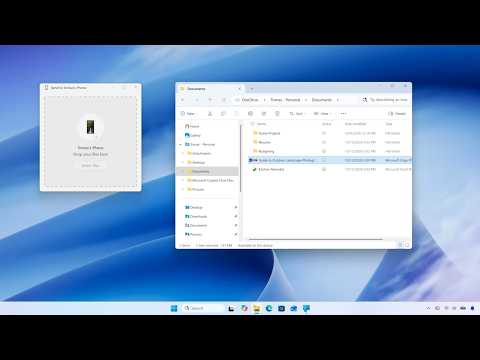
Android owners with supported devices get more flexibility. You can open phone apps in separate, resizable desktop windows, browse phone files through File Explorer, and open newly captured photos from a PC notification. The video also shows how to send a file from the PC to the phone.
Microsoft additionally highlights Resume, which lets you continue supported activities across devices. These capabilities build on the existing Phone Link experience, with easier access at the center of the pitch.
The remaining question is timing. Microsoft says its broader Windows improvements are starting to roll out, with more to come, but it gives no specific release date for these phone features. You’ll also need compatible hardware, and the available features will differ between Android and iPhone.
Thank you for being part of our community. Read our Comment Policy before posting.