Affiliate links on Android Authority may earn us a commission. Learn more.
I switched from Gmail to Proton Mail, and not just because of privacy

Here’s a scary thought: Google probably knows me better than my own mother. Between my emails in Gmail, images in Photos, all my online searches, personal Gemini conversations, files stored in my Drive account, and all the data the company collects from other Google apps I use, it can create a surprisingly accurate profile of me. The more it gets to know me, the better it gets at showing me ads that may grab my attention, which in turn will boost their profits. I get the business behind it, I just don’t like it.
I want privacy. Period. Google won’t give it to me, so I started looking elsewhere. I already ditched Google Drive and Photos for Proton Drive, and while I was initially skeptical of moving away from Gmail since I just cleaned it up, Proton Mail quickly managed to convince me to jump ship, for several reasons.
What matters most to you in an email service?
Privacy first, but you have to understand the limits
Proton is all about privacy, but Mail is probably the least private app it offers. It’s not the company’s fault, though — it’s just how email works.
Thanks to end-to-end encryption, Proton can’t read the content of my emails. It can still see some metadata like sender and recipient addresses — that’s just how email routing works — but the actual content of my messages is encrypted and invisible to it. That’s a stark contrast to my Gmail account, where Google can see everything, including the content, and is constantly scanning my emails to provide specific features like Smart Reply.
So from that perspective, Proton is definitely safer and more private than Gmail, but that’s not the whole story. Proton’s encryption only truly works when I send a message to another Proton user. When that happens, all the data is stored on Proton’s servers, making it completely private. But as soon as I send an email to someone who has a Gmail account, Google can basically still see everything on their end, as that’s something Proton has no control over.
This was one of the reasons that held me back from switching to Proton, as complete privacy isn’t really possible outside of Proton accounts, at least at first glance. I’ve been dealing with email for almost 20 years and I don’t think I’ve ever sent one to a Proton user.
Don’t want to miss the best from Android Authority?
- Set us as a favorite source in Google Discover to never miss our latest exclusive reports, expert analysis, and much more.
- You can also set us as a preferred source in Google Search by clicking the button below.


There is, however, a workaround. Proton does allow me to send an encrypted email to non-Proton Mail users, but it’s a bit of a hassle. I can encrypt each email and set a password for it — and even set a self-destruct timer — and when a Gmail user gets it, they have to click a link in the email to see it. The email and its content are safely stored on Proton’s server, and the user has to enter a password to see it. That basically solves the problem, but I’d have to send the password to the email recipient via a message for this to be truly private, which, again, is a hassle not many people will deal with.
So Proton Mail may not offer as much privacy as I’d like, as I’m definitely not encrypting every email I send. However, I have peace of mind knowing that when I do send something that’s a bit more sensitive, the option is right there in front of me. Also, while I use Proton Drive mainly for its end-to-end encryption, privacy isn’t the only reason I like Proton Mail.
Encryption aside, Proton still wins

Proton Mail is a joy to use. One of the first things I noticed when setting up an account was the Newsletter button. Those of you who read my Gmail cleanup post know that I had to open up old newsletters one by one and unsubscribe from each one individually. It wasn’t as much of a pain as I expected, but I did miss several in the process, which is something that doesn’t happen with Proton’s superior solution.
The Newsletter tab shows me all the newsletters I’m signed up for on a single page. It shows me how many emails I received last month, how many of them I haven’t read, and most importantly, I can unsubscribe from them with a single click. It’s fast. It’s easy. It’s convenient. It’s the one feature I think Gmail and every other email provider should have. Google did actually release this feature, but it’s not available globally — I don’t have access to it.
Email management is great as well, as I was able to set up my own version of Inbox Zero, just like on Gmail. I created several folders (Important, Promo, etc.) and whenever I get an email that I want to keep, I place it in a dedicated folder — if it doesn’t go there automatically — which keeps my main view email-free. Proton has a leg up on Gmail here because it allows for both folders and labels, while you only get the latter with Google’s email service. For example, I throw all the important emails in the Important folder in Proton, which consists of emails from my partner, friends and family, doctor, accountant, and a few other people. I can then add a label to only the emails I get from my partner, so I can see them all on one page with a single click. This two-level email organization is something Gmail doesn’t offer, and now that I’m using it, I can’t go back.
I can decide to delete an email after a specified time, which really helps me keep my inbox clutter-free.
I also like how I can manage the emails I don’t want anymore. There’s a standard Trash button that gets rid of them, just like on Gmail and every other email provider. But Proton took it a step further here by adding in a self-destruct option. It basically deletes the email after a specified time, which really helps me keep my inbox clutter-free.
For example, I buy stuff online all the time. Just last week, I went to an amusement park and bought tickets online, which were delivered to me via email. I need that email to get into the amusement park since it contains my tickets, but after my day trip is over, the email is practically useless. So instead of going back to delete it, which is something I won’t remember to do anyway, I can just set it to self-destruct in a day when I open it up.
I also much prefer the number and layout of the settings in Proton Mail vs Gmail. I mean, check out the screenshots below and see for yourself. Proton has everything nicely laid out, while Gmail’s settings are so cluttered that my head starts to spin as soon as I open them.
Then there are email aliases I can set up in combo with Proton Pass, making sure I don’t share my real email address with just anybody. And if you thought Proton is completely AI-free because of privacy issues, you’d be wrong. There’s the Proton Scribe feature that can help you compose an email, just like Gemini in Gmail. The difference is that it doesn’t keep any logs like Gemini, so it’s completely private. It can also run locally for extra security, making sure no data leaves your device.
I also really like the UI of Proton Mail — especially on desktop — as it feels more professional and minimal than Gmail. There are also a few themes on offer as well, so I can make it look more like I want to. It’s not as robust as Gmail, but I actually prefer it since the themes are less quirky than what you get with Google’s email service.
Here’s where Gmail has the upper hand

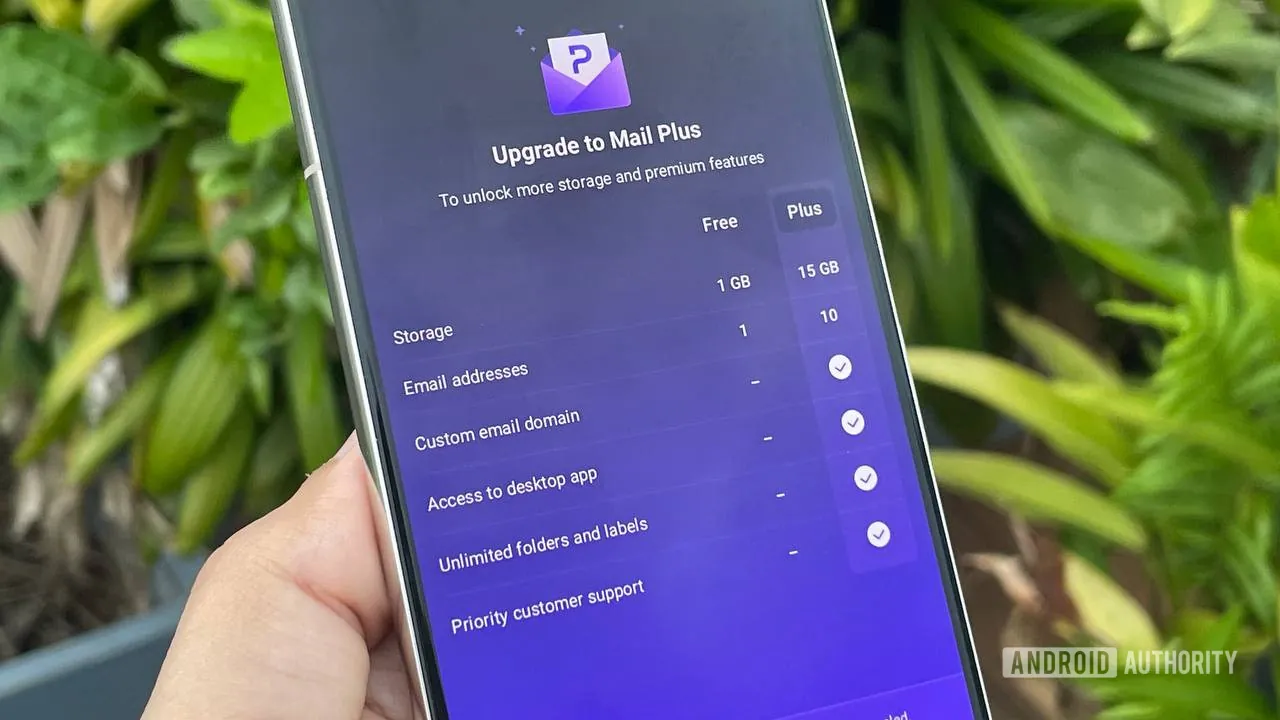
Proton Mail is great, but far from perfect. First off, its free tier is more or less a joke. It’s there just so you can demo it to see if you like it, as its 1GB cap won’t get you very far. For reference, Gmail has a far more generous 15GB free tier that’s used across its services (Gmail, Drive, Photos).
You’ll need a subscription to use it long-term, with pricing starting at $4.99 per month for 15GB of space. You can also get Proton Unlimited at $12.99 per month (or $9.99 per month on an annual plan), which gets you 500GB of storage across several Proton services, including Mail, Drive (Docs included), Calendar, and Pass, which stores your passwords. There’s also a VPN included in the bundle as well as Proton Meet for online conferencing. It’s a better deal from my standpoint, although it’s more expensive than what Google offers. It’s hard to compare them 1:1 since Google doesn’t have a VPN, for example, but it does offer other services that Proton doesn’t. And for reference, you can get 2TB of storage across its apps — 4x more than Proton offers — for $10 per month.
The search in Proton Mail is not the best.
Then there’s the search. It’s not as fast on Proton and definitely not as good, which makes sense considering that the company offers end-to-end encryption and doesn’t have an AI scanning your email at all times. AI allows you to search with natural language on Gmail if you’re looking for a specific email you can’t remember precisely (example: holiday reservation), while Proton doesn’t let you do that to the same degree.
Proton Mail is also just generally slower, although it’s not a world of difference. You won’t notice that much if you don’t compare the two side by side. What you will notice is the difference in the Android apps. Proton, for reasons unknown to me, doesn’t allow for text formatting. You can’t bold or italicize your text, for example — you can do it on the web version, though. Gmail obviously allows this, so if you’re constantly formatting your emails on mobile, Proton Mail is not for you. And regarding that Newsletter tab I mentioned, it’s not available on the Android app — only on desktop.
So while Proton and I became great friends very fast, it’s not something I’d recommend to anyone. If sending private emails isn’t your priority, you don’t see any benefit in any of the other Proton apps bundled in its Unlimited subscription, and you don’t care for the extra features like folders and a dedicated newsletter tab, stick to Gmail or whatever else may work for you. But if privacy is a concern with certain emails, you enjoy specific features or the look of the app, or just want to de-Google your life, you really can’t beat Proton Mail.
Thank you for being part of our community. Read our Comment Policy before posting.