Affiliate links on Android Authority may earn us a commission. Learn more.
Google Docs adds 3 new caption and cross-reference features to simplify complex documents

Nov 19, 2026 — 3:43 PM ET


- Google Docs gets three new features: inline captions, cross-references, and tables of captions.
- The changes are designed to make creating academic papers, reports, and technical documentation easier.
For as easy as Google Docs can make things, there are some tasks that are still quite tedious, but now some are becoming a little less so with the introduction of three new features: inline captions, cross-references, and tables of captions.
The trio looks particularly helpful when creating long, complex documents such as academic papers, reports, and technical documentation.
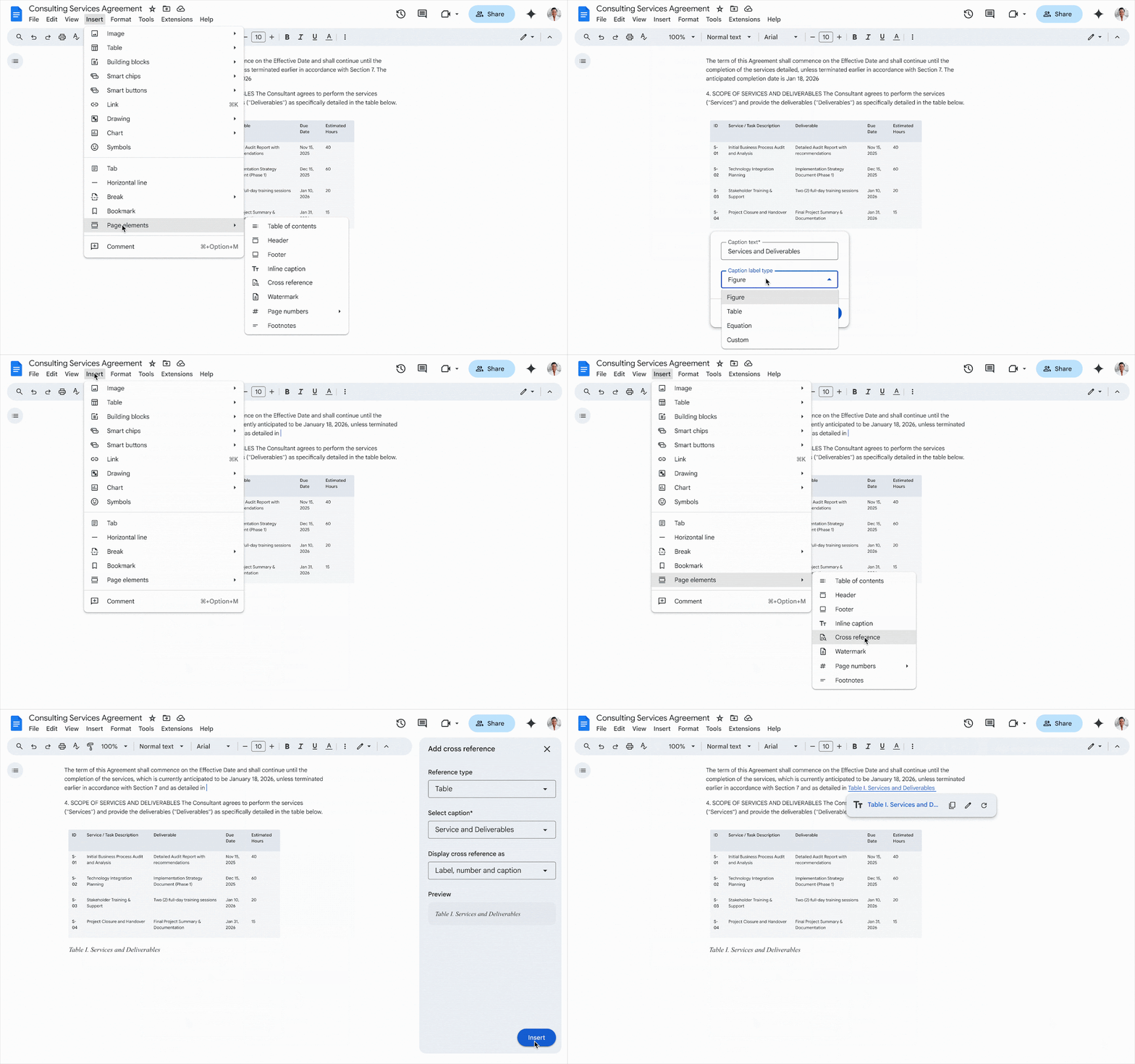
With inline captions, users can attach numbered or custom-defined labels to elements in a document. As items are added, removed, or moved around, Docs will automatically handle ordering and renumbering them in sequence. To add an inline caption, open a document and go to Insert > Page elements > Inline caption.
Cross-references let users link directly to existing captions within the text of the document. The linked words are dynamic text, enabling them to update when changes are made to the caption they reference. Once a document contains at least one caption, you can go to Insert > Page elements > Cross reference to link it.
A table of captions is similar to a standard table of contents, just for the captions within a document. Docs can now generate one that’s a clickable index of the captions and page numbers within a document that are organized by label type. This allows readers to jump right to specific figures, tables, or equations. To generate a navigable list of captions, go to Insert > Page elements > Table of captions.
Despite these changes simplifying some of the most laborious details, they can set off worries about compatibility. Once everything is in place in a document, the last thing you want is to have to recreate all the tiny details when it gets ported over to another platform. So rest assured, Google says the new features are designed to remain intact when importing or exporting with Microsoft Word.
This update to Docs is rolling out now to all Google Workspace customers, Workspace Individual subscribers, and users with personal Google accounts. It will be on by default for all eligible users.
Conversation
Read what readers said or add your take.