Affiliate links on Android Authority may earn us a commission. Learn more.
Here’s a demo of Google Calculator’s new Unit Conversion feature and a preview of Pixel Solver


Nov 13, 2026 — 5:53 AM ET


- Google announced Unit Conversion and Pixel Solver for Google Calculator with the November 2026 Pixel Drop, but the new features haven’t reached all users yet. So we managed to activate them for a look.
- The converter supports over 130 currencies with live exchange rates, along with everyday and technical units such as length, temperature, data, and fuel efficiency. It’s set to come to the Pixel 6a and newer in all regions.
- The Gemini-powered Pixel Solver (“Ask Math”) refused our queries because of its Pixel 11 exclusivity.
Google recently rolled out its November 2026 Pixel Drop, headlined by a substantial upgrade to the stock Calculator app. The update adds two major features to Google Calculator: a built-in Unit Conversion module and a Gemini-powered Pixel Solver tool. As is usually the case with Google apps and updates, Google’s announcement does not directly coincide with a rollout, and many users have pointed out that they are missing the new features despite installing the November update. We got the Unit Conversion feature up and running on our test device so you can see what’s actually coming your way.
APK teardown
This reporting is based on work-in-progress code. These features may not ship.
Previously, converting units or checking exchange rates meant jumping out of the Calculator app and into Google Search or other third-party apps.
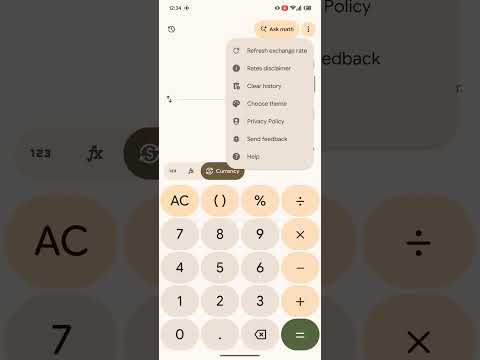
Google Calculator’s latest v10.0 update fixes that annoyance by adding a dedicated double-arrow toggle next to the standard number pad and scientific function buttons (though the new features aren’t rolling out to all users just yet).
Tapping the conversion toggle brings up a searchable unit picker organized into distinct categories:
- Currency: Supports over 130 currencies with live exchange rates, complete with country flags and standard three-letter currency codes (such as AFN, AUD, and BSD).
- Everyday measurements: Includes Length, Weight, Temperature, Volume, Speed, Time, and Area.
- Technical and scientific units: Covers Data (MB, GB, GiB, TB, etc.), Fuel efficiency (L/100km, mi/gal, km/L), Power, Energy, Pressure, Angle, and Force.
The Unit Conversion feature in Google Calculator is set to become available on Pixel 6a and newer across all regions and languages, unlike Pixel Solver.
Pixel Solver (Ask Math) teases AI-powered custom calculators
In the top-right corner of the main screen, Google Calculator v10.0 adds a prominent “Ask Math” pill button featuring a magnifying glass with a Gemini sparkle icon. Tapping it launches an introductory “Math made easier” splash screen outlining three core capabilities: typing natural-language math questions, saving custom formulas for quick reuse, and viewing step-by-step calculations.
Dismissing the splash screen opens the “Ask about math” bottom sheet, which includes a prompt box, a history button, and suggested starter prompts like “Split a $135 bill with 18% tip for 4 people” and “Create a BMI calculator.”
Tapping “What can ‘Ask math’ do?” reveals that the tool can handle homework equations, scale recipes, calculate loan payments, and build interactive tools saved to a My tools section.
However, attempting to run an actual query on our test device confirms that the Gemini backend refuses to process requests. While we managed to load the UI elements and even log queries in the local history menu, Google appears to be enforcing Pixel 11 exclusivity for Pixel Solver.
Here’s a demo of the new features within Google Calculator v10.0:
We’ll keep you updated when these features actually begin rolling out to all users.
Conversation
Read what readers said or add your take.