Affiliate links on Android Authority may earn us a commission. Learn more.
Fed up with ads and bloatware on your smart TV? People are vibecoding ways to remove them
Oct 20, 2026 — 4:30 AM ET



- Hundreds of smart TV owners are vibe-coding solutions to remove ads and bloatware from their Android TVs.
- People are also using Claude Code or ChatGPT Codex to develop custom home screens or rescue old resource-hogging hardware.
- While the steps are easy, you must exercise caution, especially as vibe-coded solutions aren’t always so high on security.
Bloatware and ads have long been pressing issues with smart TVs, and the problem has only gotten worse recently. Proficient users have previously resorted to specialized debloat tools for Android TV or the simpler push-it-under-the-rug approach of using free Android TV launchers that hide all the unnecessary bits. Now, a new savior is in town, and it’s one we’ve seen debloat and resurrect old devices before: Claude Code.
YouTuber Ansub Khan recently posted a video account of how they let Claude completely reform their Android TV, removing unwanted ads and bloatware, and consequently making it work faster. The AI companion essentially built a new home screen experience from the ground up, so they see a clean and fresh UI, rather than what we’re accustomed to.
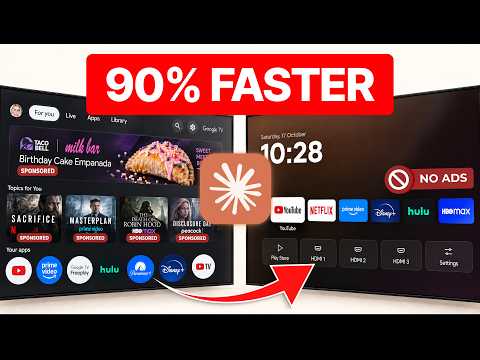
Khan’s solution also strips Android TV of background activities and ad-tracking services. As a result, the vibe-coded interface only shows big app logos as blocks rather than cards previewing content you were watching. The process works over Android Debug Bridge, fondly known as ADB, connecting the TV wirelessly to a computer and letting Claude do its magic.
To make the process simpler for anyone who’d like to replicate these steps, Khan has even compiled the resources on a GitHub page for a project titled “TV Detox.” The packages also come with a prompt you can run to fetch the resources and install them on your TV. Don’t want to use Claude Code? You can use the same steps with ChatGPT’s Codex, or another AI chatbot interface that runs locally on your PC and can control parts of it.
The project is claimed to work on a range of TVs running Android 9 through Android 14, though the changes have been tested with emulators, not actual hardware. Khan says the project can can also be used to scrub unwanted background apps off certain Fire TV sticks since the OS essentially runs on Android (save for a few lower end models). However, Amazon blocks certain actions such as changing the home screen.
Not your only option
Khan’s TV Detox is not the only solution that helps achieve a similar end. Clean your TV is another cleanup project that has been going rather viral on X. The virality has led to the solution being extensively field-tested by thousands of people now, backing the project with evidence.
Vibe coded my parents’ TV this afternoon!It was showing a sponsored ad before you could even get to Netflix.Gave Claude Code the model number, it found the TV on wifi, removed 25 Xiaomi packages and wrote a new launcher.Looks like an Apple TV now lol https://t.co/E5Q4A1b0yI— Gathin (Ø,G) (@gathint) October 17, 2026
Its developer claims Clean your TV has been tested across 80+ models from more than two dozen smart TV brands. The code has also been used to fork newer cleanup solutions, now also benefiting devices that weren’t previously covered. This includes a cleaner Apple TV-inspired launcher for LG TVs running webOS (not based on Android) and even an Android TV launcher that looks like a retro bookshelf.
For other vibe-coders, the process has been as simple as asking Claude to “hack” their TV.
But should you really do it?
Needless to say that no matter how effortless the process seems, it has certain repurcussions. The most pressing is that any form of fiddling with the TV’s original software voids your warranty. That may be fine with folks running TVs that are several years old, but if you have a newer model, we would simply recommend resisting the temptation.
Despite the evidence shared by developers, there’s no guarantee that the solutions will work. A user on X pointed out how they ended up bricking their TV in the process. Another one got stuck midway while trying to achieve similar results with their Fire TV stuck using Claude.
You must also exercise extreme caution while trying to break into TVs that don’t run the Android TV interface; cue: Samsung and LG. An X users pointed out how trying to debloat Samsung TVs requires using brute force, which can brick the system. It’s relatively easier to achieve results such as a custom home screen or using a specific DNS to block ads, but getting the same result as Android TV-specific solutions would be unrealistic.
On top of that, the biggest concern lies in the fact that these solutions are vibe-coded, which means security is possibly the last priority. Vibe-coded apps have a reputation of neglecting vulnerabilities or make them prone to prompt injection attacks. Further, given the scale at which they’re propogating, it’s quite likely the developers don’t continue supporting projects for very long. So, it’s best to proceed with caution and a sense of preparedness in case things go south.
Thank you for being part of our community. Read our Comment Policy before posting.