Affiliate links on Android Authority may earn us a commission. Learn more.
WhatsApp for Android could soon let you read messages secretly without sending blue ticks
Nov 5, 2026 — 3:30 AM ET


- WhatsApp for Android beta code shows the service is testing a peekable preview window that lets you read chats without triggering read receipts.
- Long-pressing a conversation will soon pop up recent messages and a refreshed context menu, while leaving the sender’s message unread.
- Unlike iOS, Android’s peekable preview card will let you scroll up to inspect more messages discreetly.
WhatsApp offers users a global toggle for read receipts, letting them control whether they send and receive blue ticks for when messages are read. Many people keep read receipts off entirely, while others keep them on. Those in the second camp often find themselves wanting to know more about a message without sending a read receipt (two blue ticks). You can glean information from the message notification, but this doesn’t work out if you’ve already swiped away the notification or you get too many messages to keep track of. iOS users have long had a way to peek at messages without triggering a read receipt, and we’ve now spotted clues that this could be coming to WhatsApp on Android too.
You’re reading an Authority Insights story. Authority Insights brings you all the latest exclusive reports, app teardowns, leaks, and in-depth tech coverage from the Android Authority team that you won’t find anywhere else.
iPhone users have long enjoyed the ability to press and hold any conversation thread in their chat list to open a pop-up window showing the most recent messages. Crucially, doing so allows them to glance at incoming texts discreetly without opening the message thread or triggering blue ticks/read receipts. This works for a fair number of messages, though too many messages/longer messages cannot be fully peeked at since the peek window does not allow for scrolling.
Currently, Android users get a much more utilitarian experience. Long-pressing a thread simply selects it and reveals a top action bar with tools to pin, archive, mute, or delete the conversation. Tapping the three-dot overflow menu surfaces extra options like Mark as unread, Add to Favorites, or Block, but none of these give you a peek inside the actual discussion.
WhatsApp for Android beta v2.26.44.12 includes code for iOS-style peekable chat previews, suggesting an overhaul for this workflow for Android users. We managed to activate the feature ahead of its release, and in its current state, it works quite similarly to how it does on iOS. Long-pressing a conversation pops up a floating card showing the latest messages in the thread.
Beneath the preview card sits a refreshed context menu that neatly organizes the previously available quick actions, including Pin chat, Archive chat, Mute notifications, Mark as unread, and Delete chat. Most importantly, our testing indicates that peeking at a conversation via this preview window does not trigger read receipts, finally giving Android users a native workaround to read messages in secret. The icing on the cake is that users get the ability to scroll up in this peek window to review more messages without triggering a read receipt on any of them.
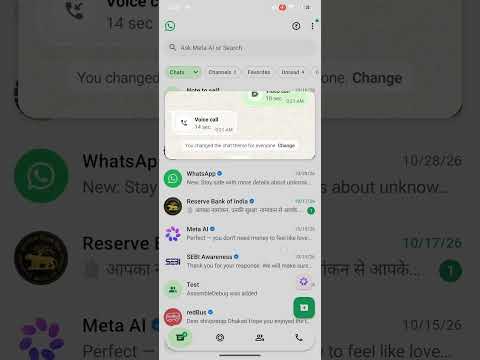
The chat preview interface is still under active development and not yet available, even to public beta testers. As with most unreleased WhatsApp features, there is no official word on when it will roll out to stable builds, but its presence suggests we could soon get feature parity between the Android and iOS app versions on this end.
Conversation
Read what readers said or add your take.