Affiliate links on Android Authority may earn us a commission. Learn more.
SwiftKey’s answer to Gboard’s Rambler mode has one big privacy advantage
Sep 10, 2026 — 4:48 AM ET



- A new AI voice mode is rolling out in SwiftKey beta, and it works similarly to Gboard’s Rambler mode.
- It can transcribe your ramblings into properly formatted text, complete with punctuation.
- It also works completely offline, unlike Rambler mode.
If you’ve been itching to try out the new Rambler mode in Gboard but don’t have the latest Pixel 11, you might want to check out SwiftKey. It’s one of the best Gboard alternatives, and it now has an upgraded voice typing feature that’s very similar to Gboard’s Rambler mode.
You’re reading an Authority Insights story. Authority Insights brings you all the latest exclusive reports, app teardowns, leaks, and in-depth tech coverage from the Android Authority team that you won’t find anywhere else.
While testing the latest beta version of the SwiftKey keyboard on Android (v9.13.16.4), we noticed a notification for a new “AI voice” mode. It’s essentially an upgraded version of SwiftKey’s dictation feature, and you can enable it using the familiar microphone icon.
When you set it up for the first time, SwiftKey downloads the AI voice model directly to your phone. The feature processes everything locally rather than sending your voice data to the cloud, which is great for privacy, though it does introduce a few limitations. For example, SwiftKey’s AI voice mode can’t rewrite or adjust the tone and style of your dictated text.
However, it automatically adds punctuation and cleans up your transcription on the fly. You can literally “ramble” about something and have SwiftKey clean it up and format it properly.
Check out the new SwiftKey AI voice mode in action:
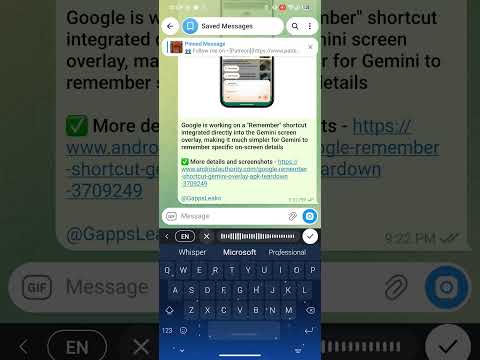
AI voice mode appears to be rolling out widely in the beta version of SwiftKey on Android. We checked several devices, and the AI voice prompt appeared on all of them. Keep in mind that it’s currently available only in English. If you don’t want to wait for the feature to reach the stable channel, you can grab the beta from the Play Store and try it out right now.
Conversation
Read what readers said or add your take.